


WINDOWS ENDPOINT DLP PILOT
Data Loss Prevention software for businesses
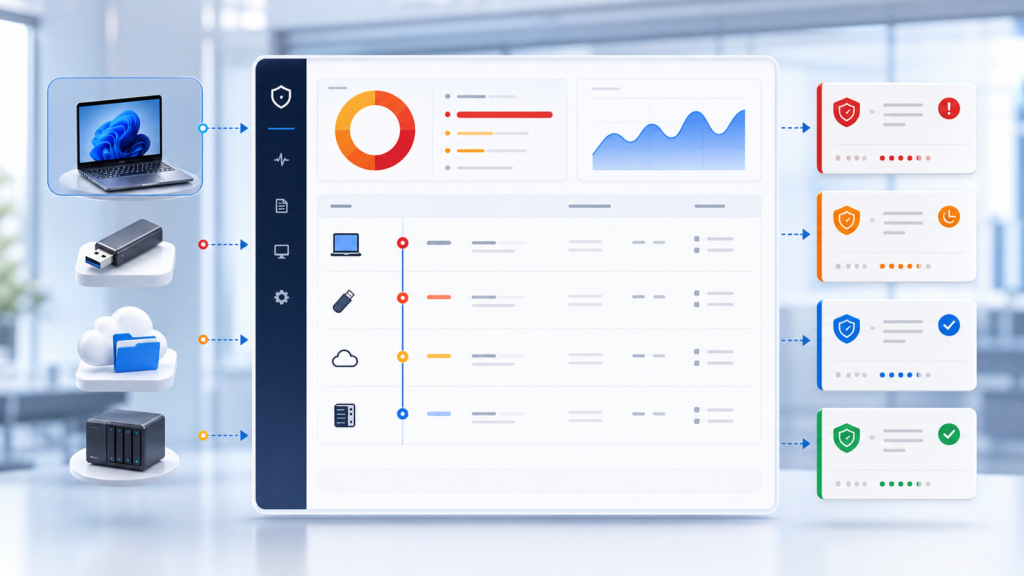
ITS DLP helps businesses observe Windows endpoint file activity, identify noteworthy destinations such as USB storage, local cloud-sync folders and network shares, and centralize events for review, evidence and policy improvement.
Start with representative endpoints, learn from real activity and tune policy before expanding across the business.

What does ITS DLP currently do?
ITS DLP is a Windows endpoint DLP module under controlled pilot deployment. It collects privacy-conscious event metadata and sends it to a tenant-scoped management system so IT teams can review risk without uploading original files or full file content.
See risky destinations
Classify removable storage, local cloud-sync folders and UNC or mapped network shares.
Prioritize incidents
Combine file count, bytes, destination and repeated behavior into reviewable incidents.
Improve policy with evidence
Assign owners, add notes, close false positives and export operational evidence.
Current product scope
The public scope is limited to capabilities verified in the current product source and project state.
Endpoint signals
- Allowlisted file create, modify, delete and rename activity.
- USB volume and file metadata.
Policy context
- Keywords, regex, file names, extensions, minimum size and exceptions.
- Bulk activity and destination classification.
Operations
- Risk score, timeline, owner, notes, saved views and CSV export.
- Local tray, Telegram and email notifications when configured.
Privacy
- No original file upload or full-content collection.
- Redacted or hashed paths and masked detection samples.
Conditional pilot
- Microsoft 365 directory/activity integration requires tenant permission and subscription validation.
Roadmap boundaries
- Endpoint block/quarantine, OCR, fingerprint and exact-data matching are not completed capabilities.
Current capability and roadmap matrix
This matrix separates functions that can be piloted now from future product work.
Area
Current meaning
Status
Windows endpoint
File activity, USB, clipboard file intent, destination classification and risk aggregation.
Available for pilot
Incident workflow
Timeline, risk score, owner, notes, review states and CSV.
Available for pilot
Microsoft 365 audit
Technical integration exists but tenant validation is required.
Conditional pilot
Block or quarantine
Policy vocabulary exists, but endpoint enforcement is not complete.
Roadmap
Deep content inspection
No OCR, fingerprint, exact-data match or universal full-content scanning.
Roadmap
Other cloud connectors
Google Workspace and Dropbox direct connectors are not production-ready.
Roadmap
CONTROLLED ADOPTION
From visibility to a usable policy
A DLP rollout should begin with a representative group and measurable evidence rather than broad enforcement.
- Map important data paths and endpoint groups.
- Collect a baseline of normal activity.
- Apply rules and exceptions to priority use cases.
- Review incidents and reduce false positives.
- Decide whether to expand, redesign or pause.
A practical DLP pilot path
01. Discovery
Confirm endpoints, channels, sensitive data use cases and stakeholders.
02. Baseline
Observe normal file activity within the approved scope.
03. Policy tuning
Test rules, review incidents and document exceptions.
04. Decision
Assess evidence, operational effort and next-stage readiness.
Frequently asked questions about ITS DLP
Does ITS DLP block file copies today?
The current endpoint scope focuses on audit, alerts and incident evidence. Block and quarantine are not marketed as completed capabilities.
Does it upload business files to the server?
No. The current design sends event metadata and protected evidence, not original files or complete file content.
Can it monitor cloud storage?
It can classify common local sync folders on Windows endpoints. Direct cloud-service connectors require separate validation and are not equivalent to local folder visibility.
Does it support macOS or Linux?
The verified endpoint implementation is Windows. No public macOS or Linux support claim is made.
How long is data retained?
Server-side event retention defaults to 90 days; local scan cache and activity rollups use shorter defaults that must be reviewed for each pilot.
Is the product commercially licensed already?
Pricing and licensing have not been finalized, so this Page offers a scoped pilot rather than an invented package.
Related DLP pages
DLP evaluation guides
Read what DLP is, use the selection checklist, then review false positives and employee privacy before a pilot.
Which businesses need DLP?Explore an ITS DLP pilot based on real scope
Share your Windows endpoint count, priority data channels and privacy requirements. IT Systems will propose a representative pilot group, initial rules and evidence criteria.