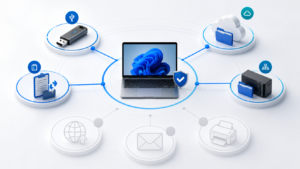
A business should assess Data Loss Prevention (DLP) when important information regularly moves through employee computers, USB storage, local cloud-sync folders or network shares, but the IT team cannot reliably explain who acted, where the data went and whether the activity was legitimate. DLP is not reserved for large enterprises. A smaller company may have a strong need when the value of its data, contractual obligations or employee turnover makes even one incident costly.
This guide helps determine whether DLP belongs on the roadmap before evaluating products. For the verified product scope, see ITS DLP software for businesses. For an evidence-based evaluation, review the DLP pilot implementation process.
Which types of businesses benefit from DLP?
DLP is most relevant to organizations that hold valuable information, allow it to move through several channels and need a repeatable investigation process. Technology, manufacturing, professional services, finance, distribution, healthcare, education, design and customer-data operations often have clear use cases. Industry alone, however, is not enough; the decision should follow real data flows and business impact.
| Business characteristic | Risk to investigate | How DLP may help |
|---|---|---|
| Customer files, contracts and quotations | Copies to removable or personal storage | Create event and destination evidence |
| Source code, drawings, formulas or designs | Unusual bulk copying before a departure | Prioritize noteworthy activity sequences |
| Remote teams or multiple offices | Data spread across laptops and sync folders | Centralize endpoint events into incidents |
| Audit or partner obligations | Inability to explain who did what | Provide timeline, owner, notes and review status |
Nine signs your business should assess DLP
1. IT cannot explain where a file went
When a suspicious copy is reported, the team may know that a file once existed on a computer but lack the destination, time, user and scale. Endpoint DLP can help close this evidence gap.
2. USB remains part of daily work
USB is not automatically malicious. Manufacturing, service and handover workflows may legitimately require removable storage. The risk is being unable to distinguish approved use from activity that needs review. See Windows Endpoint DLP for USB and file-copy monitoring.
3. Employees use several cloud-sync folders
OneDrive, SharePoint, Google Drive, Dropbox and other sync tools simplify work but complicate the data path. Detecting a local sync folder is not the same as controlling the cloud service directly, so coverage must be stated precisely.
4. Network shares are difficult to investigate
When files move between workstations and shared drives, isolated logs rarely tell the whole story. DLP becomes useful when it adds endpoint, destination and activity-sequence context.
5. Joiner, Mover and Leaver controls are weak
Role changes and departures are sensitive periods. Identity, access revocation, data handover and endpoint activity must work together. DLP does not replace identity governance, but it can add endpoint evidence.
6. The company owns valuable intellectual property
Source code, drawings, designs, customer lists and bid documents carry different risks. Define which information deserves priority before selecting a tool.
7. Incidents are handled through guesswork
If every investigation depends on one administrator and lacks an owner, timeline, notes, closure reason or false-positive state, the business needs a repeatable incident workflow.
8. Security policy exists but cannot be measured
A rule such as “do not copy company data externally” is too broad without signals, exceptions and business context. An observation-led pilot can turn policy into testable rules.
9. Customers or partners ask for control evidence
DLP can support evidence requirements alongside least privilege, MFA, encryption, backup, device management and IT system security.
When should a company avoid buying DLP immediately?
Do not rush into broad deployment when the business has not identified important data, assigned an alert owner, established basic account and device management, or agreed on privacy and retention. DLP creates signals; signals only become useful with scope, rules, exceptions and business validation.
- No approved endpoint or user inventory.
- No owner for incident review.
- An expectation to monitor every disk from day one.
- No agreement on privacy, retention or acceptable use.
- Required channels are not supported by the candidate product.
How to prioritize DLP readiness
Score four dimensions: data value, number of data paths, current detection capability and business impact. A group with high-value information, several copy destinations and little evidence should enter a pilot first.
| Question | What a “yes” means |
|---|---|
| Could one lost file affect a customer or contract? | Higher data priority |
| Does data move through USB, sync folders and shares? | Higher channel priority |
| Does IT lack a timeline and destination? | Greater evidence need |
| Is an owner available to validate alerts? | Pilot operations are feasible |
How should a DLP initiative begin?
- Select one to three use cases with clear impact.
- Choose representative Windows endpoints instead of every device.
- Define approved paths and channels.
- Observe a normal-activity baseline.
- Run rules, review incidents and document false positives.
- Evaluate evidence, operational effort and expansion readiness.
Review the current DLP data-channel coverage matrix before finalizing scope.
Frequently asked questions
Do small businesses need DLP?
They may. Employee count matters less than data value, available paths and the consequence of an incident. A 20-person company holding source code or sensitive customer files can have a strong use case.
Does DLP replace antivirus or a firewall?
No. Antivirus focuses on malicious software; firewalls control network traffic; DLP focuses on data context and related behavior.
Should USB be blocked immediately?
Not by default. Approved devices, handover processes, exceptions and user impact should be understood first. The current ITS DLP scope emphasizes audit, alerts and incident evidence during a controlled pilot.
Does DLP inspect every file in full?
It depends on the product. Current ITS DLP prioritizes event metadata and context; OCR, fingerprinting, exact-data matching and universal content inspection are not marketed as completed capabilities.
What pilot result supports expansion?
Expansion is reasonable when evidence supports investigation, false positives remain manageable, owners review incidents consistently and the use case creates more value than operational cost.
Conclusion
A business should assess DLP when important data has multiple exit paths and existing systems cannot produce reliable investigation evidence. Start with use cases, data channels, privacy and a measurable pilot rather than a long feature list.
Request a scoped DLP pilot assessment or review the current ITS DLP scope.