


AUTODESK BUSINESS LICENSING
Autodesk licensing for businesses: choose the right AutoCAD, Revit, 3ds Max, Fusion and govern licenses
IT Systems advises architecture, construction, engineering, manufacturing, interior and design companies on valid Autodesk licensing, VAT-ready quotation and post-purchase user governance. This page helps businesses choose the right Autodesk products, avoid overbuying, avoid cracked software and connect license control with ITS Manager.

What is Autodesk licensing for businesses?
Autodesk licensing for businesses means purchasing, assigning and using Autodesk software under proper commercial terms. The portfolio may include AutoCAD, AutoCAD LT, Revit, Civil 3D, 3ds Max, Inventor, Fusion and collections for architecture, engineering, construction, product design and manufacturing. The business question is not only which software to buy. It is who uses it, for which project, whether the user needs 2D, 3D, BIM or rendering, which account owns the license, when it renews and whether it can be reclaimed when a project or employee changes.
Why build an Autodesk hub instead of buying products one by one?
If every product is bought only when a request appears, each department may choose separately, users may use personal emails, evidence may be scattered and IT may not know which devices have AutoCAD, Revit or 3ds Max installed. An Autodesk hub organizes CAD, BIM, 3D, manufacturing and rendering needs into one decision structure. IT, finance and department owners can then decide whether to buy, renew, downgrade, reclaim or replace licenses using the same data.
Quick Autodesk product selection table
The table below helps businesses orient the discussion before requesting a quote. Autodesk’s official support information confirms that AutoCAD includes specialized toolsets such as Architecture, Electrical, Map 3D, Mechanical, MEP, Plant 3D and Raster Design, while AutoCAD LT is more focused on 2D drafting and documentation. Revit, Civil 3D, 3ds Max, Inventor and Fusion should be selected based on role, industry and workflow.
| Product group | Main need | Best fit |
|---|---|---|
| AutoCAD / AutoCAD LT | 2D drafting, DWG, 3D/toolsets by edition | Architecture, construction, MEP, CAD teams |
| Revit / Civil 3D | BIM, building and infrastructure | AEC, contractor, consultant |
| 3ds Max | Render, visualization, 3D studio | Interior, visualization, marketing |
| Inventor / Fusion | Mechanical, manufacturing, product design | R&D, factory, engineering |
AutoCAD, AutoCAD LT and specialized toolsets
AutoCAD is often the entry point into Autodesk, but Autodesk should not be reduced to AutoCAD. AutoCAD LT fits 2D drafting, DWG editing and technical documentation. Full AutoCAD is more appropriate when the team needs 3D, automation, CAD standards or specialized toolsets. Businesses should read AutoCAD LT vs full AutoCAD before segmenting users. For specific buying paths, review AutoCAD licensing for businesses, AutoCAD LT and AutoCAD 2D/3D on IT Systems Shop.
Revit, Civil 3D, 3ds Max, Inventor and Fusion: choose by industry
Architecture and construction teams often review AutoCAD, Revit, Civil 3D and the AEC Collection. Interior, visualization and 3D studios may need 3ds Max. Mechanical and manufacturing teams often review Inventor, Fusion or Product Design & Manufacturing Collection. Product selection should start from work output: 2D drafting, BIM model, civil infrastructure, rendering, mechanical design, CAM or project collaboration. IT Systems should advise based on real departmental workflow, not a long product list.
Comparison: standalone Autodesk purchase vs governed licensing
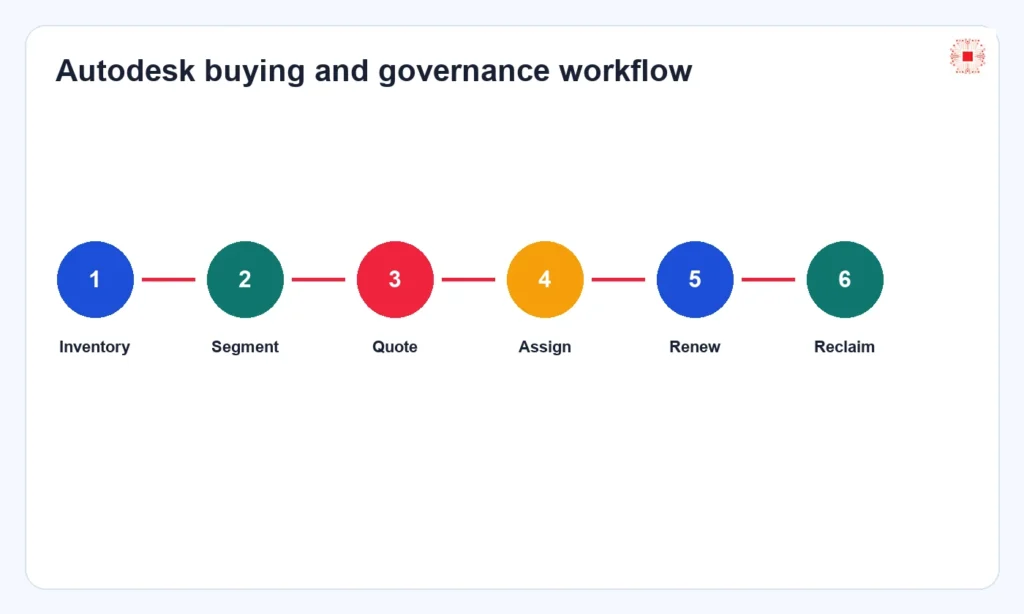
Buying one license at a time may be fast early on, but when CAD/BIM users grow, the company needs a more governed process: inventory devices, segment users, identify products, choose terms, quote, assign, hand over administration, track renewal and reclaim seats. For high-value software, good license governance can save meaningful cost by avoiding overbuying, idle seats and wrong license assignment.
| Factor | Fragmented buying | Governed process |
|---|---|---|
| Input data | One-off request | User, device, project, evidence |
| Assignment | Often personal-email based | Owner and history |
| Renewal | Manual reminder | By license/user |
| Reclaim | Often missed | Connected to offboarding |
What information should be prepared before requesting an Autodesk quote?
Before requesting a quote, the business should prepare user count, departments, roles, project types, current software, 2D/3D/BIM/render/CAM needs, devices currently installed, admin email, desired term, VAT invoice requirements and legacy license status if any. If data is not ready, use software license quote preparation for businesses. Good preparation shortens the quotation cycle and lowers the risk of buying the wrong product.
Managing Autodesk licenses after purchase with ITS Manager
After purchase, the company still needs to govern license lifecycle: who receives each seat, which device has software installed, which department owns cost, which project requires it, when it renews, which user has left and which license can be reclaimed. ITS Manager software license management connects users, devices, installed software, evidence and renewal dates. This turns Autodesk licenses from a purchase transaction into operational data that can be controlled.
Cracked AutoCAD, Revit or 3ds Max risk
Cracked or unclear Autodesk software can create legal risk, malware exposure, file errors, design data loss and support difficulty. For companies handling client drawings, construction documentation, factory layouts or mechanical designs, design files are critical assets. The right response is to inventory first, classify installed devices, identify real users, buy valid licenses by priority and remove unclear installations. Buying blindly without understanding usage can still waste budget.
Connecting Autodesk to the IT Systems licensed-software cluster
This Autodesk page should link to the broader licensed software for businesses pillar, AutoCAD, Microsoft, Adobe, software license management, inventory checklist and license reclaim process. This structure helps Google and AI systems understand IT Systems as a topical authority for licensed software, not a single isolated post. For commerce, the page links to the Autodesk category and key products such as AutoCAD LT, full AutoCAD, Revit LT Suite and 3ds Max.
When should a business contact IT Systems?
A business should contact IT Systems when it needs Autodesk licenses for multiple users, is unsure whether to choose AutoCAD LT or full AutoCAD, needs Revit or 3ds Max for a new project, wants to legalize cracked installations, needs a VAT quote, needs inventory before purchase or wants long-term license governance. Sending the user list, departments, drawing/model types and project term helps IT Systems advise faster.
FAQ about Autodesk licensing for businesses
Is Autodesk licensing only AutoCAD? No. AutoCAD is one part of the portfolio; Revit, Civil 3D, 3ds Max, Inventor, Fusion and collections may also be relevant. Should every user get the full product? Not by default; segment users by need. Can a company mix AutoCAD LT and full AutoCAD? Yes, and it is often more cost-effective. Does ITS Manager replace Autodesk Account? No; ITS Manager adds internal governance for users, devices, evidence, renewals and reclaim.
Need an Autodesk license quote?
IT Systems can review CAD/BIM/3D needs, recommend the right licenses, prepare VAT-ready quotation and support user governance after purchase.