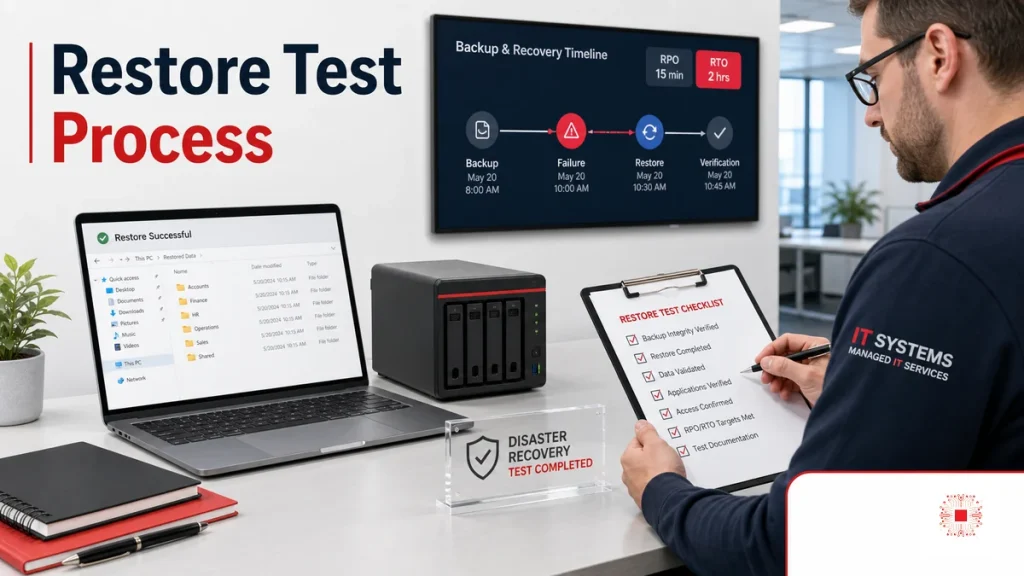
Many businesses see successful backup jobs every day and assume their data is safe. In reality, backup is only half of the problem. The real value is the ability to recover the right data, at the right point in time, into the right system and have users confirm that it works. A backup file may exist but still have permission issues, missing databases, wrong application versions, insufficient restore space or recovery times that exceed business tolerance. In IT system administration, backup must be paired with periodic restore testing. Restore testing turns vague confidence into evidence: what was restored, how long it took, who verified it and what needs improvement.
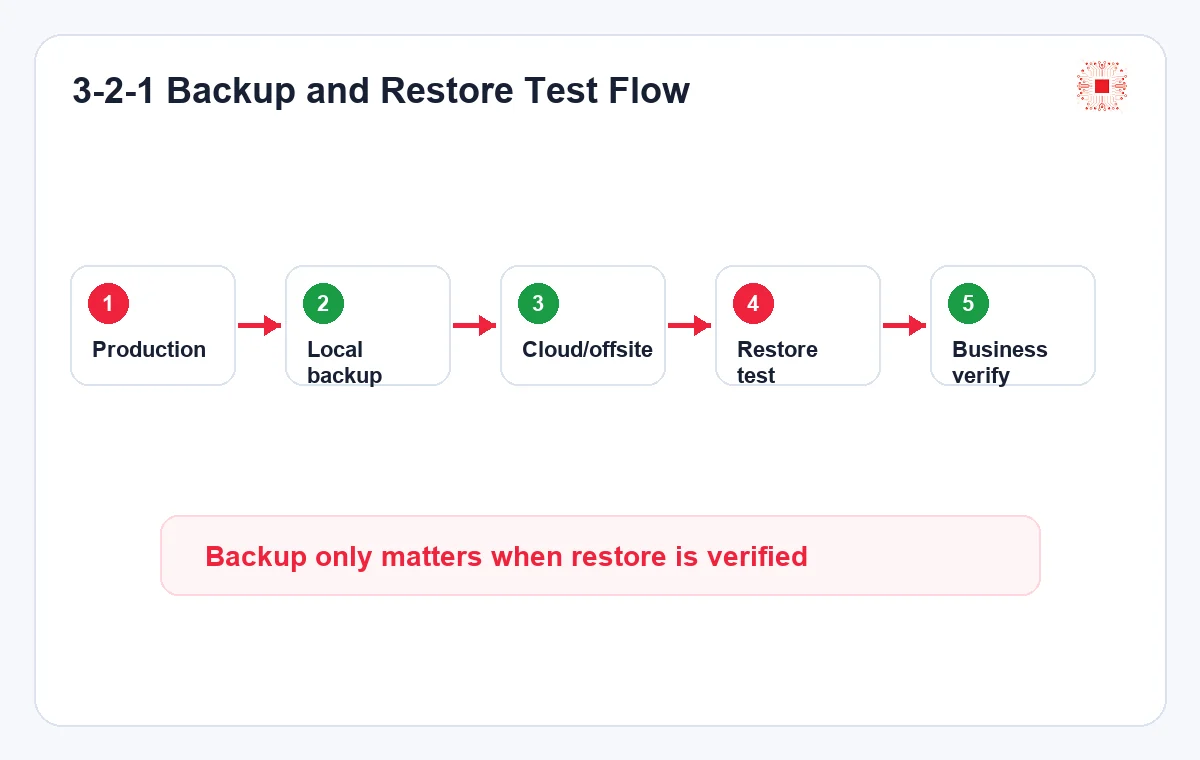
The key point is not to treat restore testing as a side task. It is a test of the company’s recovery capability: data, ownership, documentation, access, test environment, response time and risk reporting.
A practical lesson is that restoring a database does not automatically restore an entire website or system. Upload files, media records, post meta, permalinks, cache, multilingual relationships and plugin settings may live in different layers. Without a pre-restore checklist, the business may recover one part but lose links, featured images, new records or front-end behavior. The process must define what is restored, what is not restored, how data created after the backup point is handled and who gives final approval.
RPO and RTO Must Be Agreed Before Backup Design
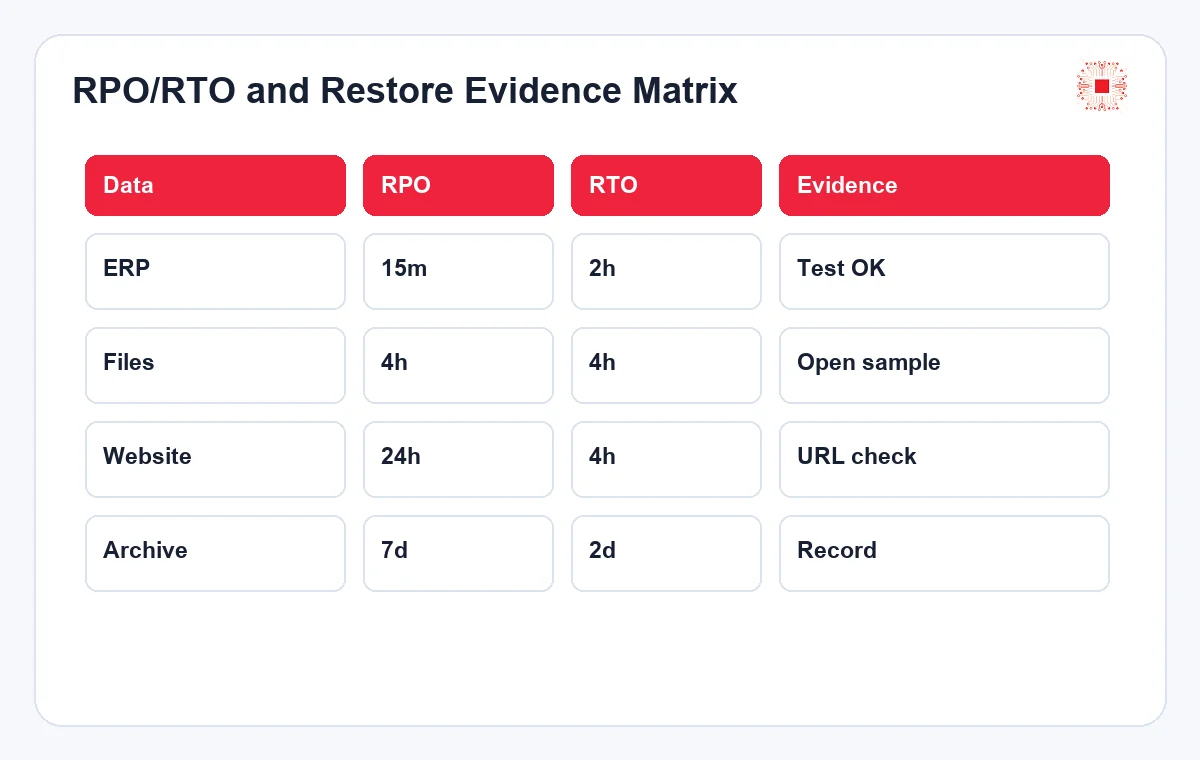
Before choosing a backup tool, the business must answer two governance questions. RPO defines how much data loss is acceptable: 15 minutes, four hours, one day or more. RTO defines how quickly the system must be recovered: 30 minutes, two hours or one business day. Without agreed RPO and RTO, IT may run backups diligently but still fail business expectations. Accounting data, contracts, CRM, email, design files, websites and internal servers rarely have the same priority. A good backup process maps each data group to RPO, RTO, an approving owner and an acceptable cost level.
A good process starts with business discussion, not with buying disks or choosing cloud storage. Accounting, sales, operations and management need to define which data matters most, which time points cannot be lost and how long the business can tolerate downtime.
This is especially important after upgrades, migrations or emergency restores. A backup strategy that worked last month may fail when WordPress, database versions, security plugins, storage paths or user permissions change. Restore testing gives the team a safe moment to discover those gaps before a real incident forces a rushed recovery.
1. Build an Inventory of Data and Systems
The first step is to build a practical inventory of data assets. SMEs often have data spread across employee laptops, file servers, NAS, Google Drive, SharePoint, email, accounting software, CRM, websites, databases and application servers. Without an inventory, the business may protect visible systems and miss critical data. The inventory should record system name, storage location, business owner, criticality, size, change frequency, legal requirements and technical dependencies. Sensitive data also needs access classification and encryption rules. This step often exposes outdated data, duplicate storage and personal folders that contain company documents outside IT control.
RPO and RTO also support cost decisions. Recovering within 15 minutes is much more expensive than recovering within four hours. When management understands this tradeoff, backup design becomes a controlled business decision rather than a technical argument.
RPO and RTO should also be written in language that managers understand. Instead of saying the database has point-in-time recovery, the report should say how many minutes of orders, invoices, tickets or files could be lost. Clear wording helps leadership decide whether the current protection level is acceptable.
| Data Type | Suggested RPO | Suggested RTO | Note |
|---|---|---|---|
| Accounting/ERP | 15 min – 4 hours | 1 – 4 hours | High priority |
| Project files | 4 – 24 hours | 4 – 8 hours | Needs versioning |
| Website | 1 – 24 hours | 2 – 8 hours | Files + DB |
| Archive | 1 week | 1 – 3 days | Cost optimized |
2. Choose a 3-2-1 Backup Model That Fits the SME
The 3-2-1 model is practical: at least three copies of data, on two different storage types, with one copy offsite or outside the primary environment. For SMEs, this can be flexible: production data, a local NAS or backup server copy and a cloud or offsite copy. Not every dataset needs the same protection. Core business data may need daily offsite copies, while lower priority data may only need weekly retention. What matters is avoiding all backups in the same machine, same disk, same admin account or same physical location. During ransomware, fire, human error or cloud failure, separation determines whether recovery is possible.
The inventory should be updated when new employees, applications, branches or workflows are added. A system outside the inventory usually has no owner, no proper backup and no recovery plan.
The inventory should include dependencies, not only data locations. A restored application may still fail if DNS, SSL certificates, API keys, scheduled tasks, OAuth connections or firewall rules are missing. Recording dependencies helps recovery teams avoid the frustrating situation where the data is restored but the service is still unusable.
3. Design Backup Schedules Around Data Change
Backup schedules should follow data change frequency and agreed RPO. Transaction databases may need several backups per day or replication, while low-change document folders may only need daily backup. Email and cloud drives need special policies because users can delete data or sync encrypted files quickly. The schedule should avoid peak hours when possible but remain close enough to important data changes. Full, incremental and differential backups can be combined to optimize capacity and time. The schedule must be documented, owned and monitored so delayed or failed jobs become visible.
3-2-1 should not be interpreted mechanically. The goal is to reduce common failure points. If local backup and production share the same admin account, ransomware may delete both. If cloud backup lacks MFA, offsite storage is still exposed.
For small businesses, the offsite copy does not always need to be expensive enterprise storage. The correct option depends on data value, internet bandwidth, restore speed and security requirements. What matters is that the offsite copy is tested, protected and reachable during the type of incident the business is trying to survive.
4. Protect Backups From Ransomware and Excessive Access
Backups are attractive targets because attackers know that deleting or encrypting them removes the recovery path. Backup accounts should not be shared with daily admin accounts. Write, delete, retention change and restore rights should be separated. Backup storage should support immutable retention, versioning or deletion protection where possible. MFA, access logs, unusual activity alerts and periodic permission reviews are required for critical data. For cloud backup, API tokens, lifecycle policies and storage cost should also be reviewed to avoid accidental deletion or uncontrolled spending.
Backup schedules must be verified by logs and alerts. Jobs that run too long, skip folders, run out of space or succeed without new data should be treated as risks. Technical success does not always mean business data is protected.
Backup windows should also be coordinated with application behavior. Some systems need database-aware backup, application quiescing or snapshot consistency. If the backup captures files while transactions are active, the job may report success but the restored data may be inconsistent. This is another reason restore testing matters.
5. What Should a Restore Test Verify?
Restore testing is not just downloading a file and opening it. Business data needs layered verification: file integrity, access permissions, database mount, application compatibility, business owner confirmation and recovery time against RTO. For websites, the test should include files, database, configuration, plugins, themes and URLs. For servers, it should include boot, services, network, license and dependency checks. Each restore test should have a record: tested system, backup date, restore date, technician, business verifier, errors, recovery time and improvement actions.
Backup access should follow least privilege. Operators may only need job visibility and approved restore rights, while deletion of retention or storage changes should be limited and approved.
Ransomware protection should include operational habits, not only technology. Admin accounts should not stay logged in on daily workstations, backup consoles should have strong MFA and emergency credentials should be stored securely. A technically good backup can still fail if operational discipline is weak.
6. Restore Test Environment: Avoid Damaging Production
A dangerous mistake is restoring directly over production when the goal is only to test. Restore tests should run in a separate environment: virtual machine, sandbox, test server, isolated folder or test database. This validates recovery without overwriting real data, sending accidental email, triggering automation or disrupting users. If production restore is unavoidable, there must be a maintenance window, a fresh backup before restore and a rollback plan. Sensitive test data may also need masking or limited access. The goal is to prove recoverability without creating new risk.
Restore tests should rotate samples. This month may test accounting files, next month the website and the following month an application server. Rotation gives broader coverage without overloading IT.
The verifier should usually be someone from the business side, not only the IT technician. IT can confirm that the file opens or the database starts, but accounting, sales or operations must confirm whether the recovered content is complete and usable for work. This separates technical recovery from business recovery.
7. Monthly Backup and Restore Test Checklist
The table below gives SMEs a minimum monthly control framework. It does not replace detailed technical documentation, but it helps management understand what has been controlled. Each line should have evidence: backup logs, ticket IDs, restore records, dashboard links or confirmation from a business owner. If an item fails, it should create an action ticket with a due date rather than a vague note. Over repeated months, the business will see trends: which backup jobs fail, which data restores slowly, how capacity grows and where investment is needed.
The test environment should match production in important areas such as database version, operating system, file permissions and application configuration. Testing in a very different environment can create false confidence.
The restore environment should have documented cleanup rules. Test copies of sensitive data should not remain forgotten on temporary servers or shared folders. After the test, the team should either delete the test environment or record who owns it, how long it remains and how access is controlled.
| Control | What to Check | Evidence |
|---|---|---|
| Backup job | Successful, on schedule, complete data | Job report |
| Restore test | Sample restored and usable | Test record |
| RPO/RTO | Meets agreed target | Measured time |
| Access | No broad shared admin access | Permission list |
| Offsite/immutable | Offsite or deletion protection | Storage setting |
8. Connect Backup With Monitoring, Tickets and Monthly Reports
Backup should not be an isolated manual check. It should connect to IT system monitoring, tickets and the monthly IT administration report. When a backup job fails, an alert should create a ticket or at least notify a clear owner. When restore testing misses RTO, the result should appear in the risk report. When backup capacity grows quickly, the report should recommend cleanup or expansion. This turns backup into governed IT operations instead of a silent background task.
A checklist is useful only with evidence. A note saying backup OK is not enough. Logs, screenshots, restore records, tickets or user confirmations make the process auditable.
The checklist should be short enough to run monthly but strong enough to reveal real risk. If the list has too many vague items, people will mark them as done without evidence. If it has too few controls, it will miss problems. The best checklist combines operational practicality with clear proof.
9. Common Restore Mistakes for Databases and Websites
Database and website restores often reveal hidden gaps. Image files may still exist on the host while attachment records disappear from the database. Public posts may return 404. WPML language links may be lost. Cache may preserve old HTML. Plugins or themes may become incompatible after restore. Website restore therefore needs its own checklist: file and database backup from the same point in time, plugin and theme versions, permalinks, media library, featured images, multilingual relationships, forms, payments, cache and sitemap. If only the database is restored, any data created after the backup point may be lost.
Connecting backup to monitoring prevents backup jobs from failing silently for days. Alerts need owners and priority levels. A failed backup for critical finance data should be handled differently from an archival folder backup.
Tickets are useful because they preserve history. When backup failures repeat, the team can see whether the same job, storage target, network path or credential is failing. This turns backup management from a daily reaction into continuous improvement backed by evidence.
10. When Should IT Systems Design the Backup Process?
A business should ask for help when data is spread across multiple platforms, backup failures are ignored, restore tests have never been performed, RPO/RTO are unclear or downtime directly affects sales, accounting or operations. IT Systems’ IT support services and IT services can review the current state, design a practical backup architecture, schedule restore tests, standardize evidence, connect alerts and include results in recurring reports. The goal is not buying another tool; it is knowing what to recover, where to recover it, how long it takes and who owns the action.
Database restore requires special care for data created after the backup point. Before restoring, export new records, media, orders or lead forms that are not included in the old backup.
Website restores are especially sensitive because content, media, SEO metadata and multilingual records are tightly connected. A page may appear online but lose featured images, canonical links, hreflang relationships or forms. Recovery checks should therefore include SEO and user-facing validation, not just database import success.
A mature backup program should end each month with three clear answers. First, which data and systems are protected according to the agreed target. Second, which restore tests were completed and what evidence proves the result. Third, which gaps require action, budget or management approval. Without these answers, the company may have storage activity but not recovery governance. For SMEs, this discipline is often more valuable than adding another tool because it creates confidence, accountability and a repeatable path when something breaks.
After any real recovery event, the team should also run a short post-incident review. The review should compare planned RPO/RTO with actual results, list manual steps that caused delay, record data that was difficult to validate and update the checklist before the next test cycle. This keeps the backup process alive instead of letting it become a document that nobody trusts during pressure.
For management, the final measure is simple: when recovery is needed, the team should know the next action without improvising.
This is operational resilience.
Need to validate your backup and restore process?
IT Systems can review critical data, design a practical backup model, schedule restore tests and include recovery evidence in monthly IT reports.