


MICROSOFT ENDPOINT MANAGEMENT
Microsoft Intune and device management for businesses
IT Systems deploys Microsoft Intune to enroll, configure, secure and centrally manage Windows computers, mobile devices and business applications. Windows Autopilot standardizes new devices from the first startup, reduces manual setup and creates clear compliance evidence.
The deployment scope is defined by user count, devices, platforms, security requirements, applications and the current Microsoft Entra ID environment.

What business problems does Intune solve?
As the device fleet grows, it becomes difficult to know which computers are encrypted, missing updates, permitted to install applications or allowed to access business data. Intune brings these controls into one centralized management platform instead of handling each device manually.
Standardize devices
Apply Wi-Fi, VPN, email, security, application and configuration policies by user group or device type.
Control access
Combine Microsoft Entra ID and Conditional Access so only appropriate users, devices and sign-in sessions can access resources.
Track compliance
Identify devices that are unencrypted, missing updates, violating policy or no longer meeting business standards.
Microsoft Intune service scope
The service can cover a new deployment or the standardization of an existing tenant. IT Systems defines the scope, licensing conditions, device groups, policies and acceptance criteria before organization-wide rollout.
Device enrollment and grouping
- Windows, macOS, iOS/iPadOS and Android within the agreed scope.
- Dynamic groups by department, ownership or device attributes.
Configuration and compliance
- Passwords, encryption, firewall, antivirus and operating system versions.
- Compliant/noncompliant assessment and remediation actions.
Application deployment
- Microsoft 365 Apps, Win32 applications, web apps and internal applications.
- Assign Required, Available or Uninstall actions by group.
Application and data protection
- App Protection Policies for business data.
- Control copying, storage and access on appropriate devices.
Updates and reporting
- Planned update rings, feature updates and quality updates.
- Track failures, at-risk devices and remediation progress.
Operational support
- Runbooks for onboarding, offboarding, resets and device changes.
- Periodic reporting, policy changes and administrator support.
ZERO-TOUCH DEPLOYMENT
Where does Windows Autopilot fit?
Windows Autopilot handles the initial deployment experience for Windows devices. Intune continues managing each device throughout its lifecycle after enrollment.
Outcome: new devices reach employees with applications, policies and security controls ready to use.
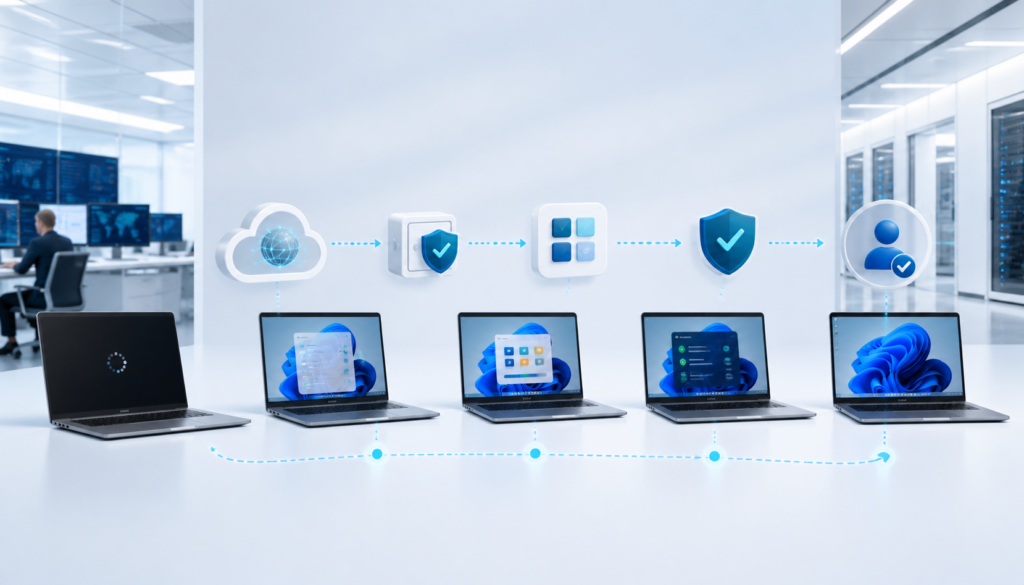
01. Register devices
Import hardware hashes or receive devices already registered to the tenant by a partner or OEM.
02. Assign deployment profiles
Choose Microsoft Entra join, the OOBE experience, user permissions and device naming conventions.
03. Configure automatically
Devices receive applications, scripts, security policies and the Enrollment Status Page.
04. Manage the lifecycle
Intune continues controlling compliance, updates, applications, resets and device retirement.

MANAGEMENT WITH EVIDENCE
Deployment workstreams and handover evidence
A successful project does more than enable policies. Each stage needs a baseline, pilot results, a rollout dashboard and runbooks so the IT team can continue operating the environment.
Pilot
Before rollout
Policy
Assigned owners
Report
Periodic tracking
Workstream
Activities
Evidence
Tenant assessment
Review licensing, domains, Entra ID, user groups, devices, applications and existing policies.
Current-state report and gap matrix.
Policy design
Build baselines for enrollment, compliance, configuration, applications and updates.
Policy catalogue, assignment groups and exceptions.
Controlled pilot
Deploy to a small group and measure enrollment, application, OOBE and user-experience issues.
Pilot results and resolved-issue register.
Phased rollout
Expand by department or location and track failed or pending devices.
Rollout dashboard and acceptance record.
Post-deployment operations
Manage changes, onboarding/offboarding, compliance reporting and policy optimization.
Runbooks, monthly reports and change logs.
Licensing conditions and scope to confirm
Not every Microsoft plan includes every feature
Intune, Entra ID, Conditional Access, Defender and Autopilot capabilities depend on the license and deployment model. IT Systems reviews actual entitlements before making a recommendation.
- Review Microsoft 365 Business Premium, Intune Plan 1 or equivalent licensing.
- Confirm user-based or device-based requirements.
- Do not assume features before checking the tenant and current licensing terms.
Information required for assessment
A structured assessment helps avoid insufficient licensing or policies that are too broad and disrupt users.
- User and device counts by operating system.
- Company-owned devices or BYOD.
- Required applications and sensitive data.
- Current Entra join or hybrid join model.
- Encryption, MFA, update and remote-support requirements.
Related Microsoft solutions
Frequently asked questions about Microsoft Intune
Is Intune a remote-control application?
No. Intune is an endpoint and application management platform. Remote support can use an additional solution depending on licensing and the operating process.
Does Autopilot reinstall Windows?
Autopilot primarily uses the preinstalled Windows image and moves the device into a business-ready state. Reset scenarios and older devices should be assessed separately.
Can Intune manage employees’ personal devices?
Yes, a BYOD model can use appropriate application and data protection policies. The business should clearly separate work data, user privacy and access conditions.
Can Intune manage non-Windows devices?
Intune supports multiple platforms, but management capabilities vary by operating system. The scope should be assessed by device type and control objective.
Will deployment disrupt users?
Risk can be reduced through a pilot, phased rollout, exception policies and a rollback plan. Broad security policies should not be applied to the entire tenant on the first attempt.
Can IT Systems continue managing Intune after deployment?
Yes. IT Systems can hand over operations to the internal IT team or provide ongoing management covering policy changes, onboarding/offboarding, compliance reporting and enrollment issue resolution.
Need to standardize and manage Microsoft devices?
IT Systems reviews your tenant, licenses, users, devices, applications and security requirements, then proposes an Intune and Autopilot roadmap with a pilot, acceptance criteria and handover documentation.
Assessment • Pilot • Rollout • Handover