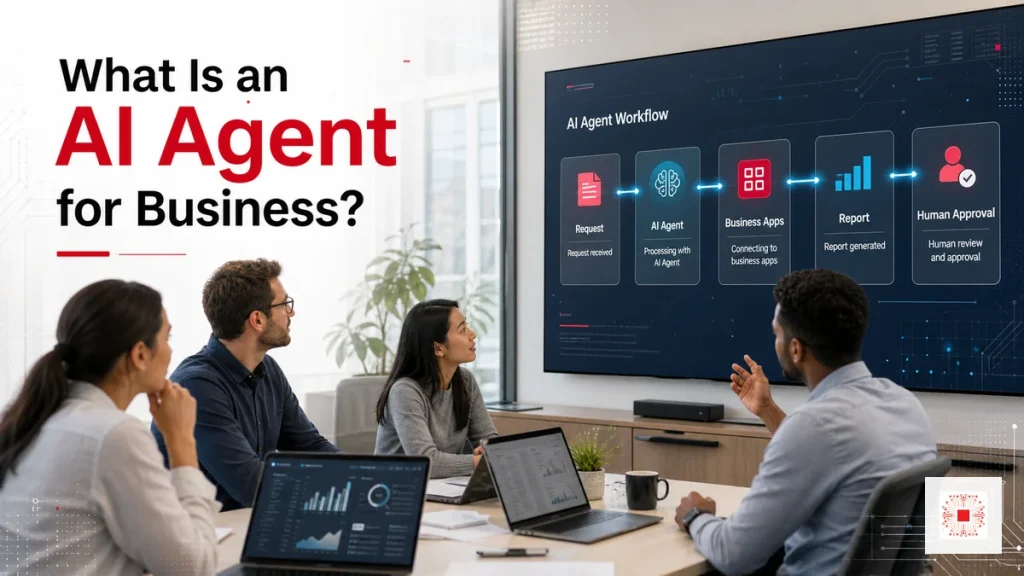
Quick summary: An AI Agent for business is an AI system that can handle a multi-step workflow, use approved data or tools and pass risky steps to humans for approval. Unlike a chatbot that mainly answers questions or automation that follows fixed rules, an AI Agent is useful for tasks such as report summaries, ticket classification, data checking, draft customer responses and workflow coordination across systems.
The important point is that an AI Agent should not be deployed as a disconnected technology experiment. The business needs to choose the right workflow, define data permissions, design human approval, keep logs and measure results before scaling. When done well, an AI Agent can become part of operations, reducing manual work and speeding up response while keeping control.
If your company is considering implementation, review AI Agent services for business from IT Systems to understand workflow assessment, scope design and safe handover.
What Is an AI Agent for Business?
An AI Agent is an AI-powered system that can understand a goal, plan steps, use approved tools or data, execute actions and return results inside a controlled workflow. Unlike a chatbot that mainly responds in conversation, an AI Agent can operate across a business process: receive a request, look up data, prepare a report, update a system, send an alert or ask a human to approve a risky step. For SMEs, the value is not simply smarter answers. The value is reducing repetitive work, standardizing execution and creating operational evidence.
In a real SME environment, this area should have an owner, review frequency, acceptance evidence and performance metric. If it remains only an idea, the AI Agent may look impressive in a demo but fail to operate reliably.
How Is an AI Agent Different from a Chatbot or Automation?
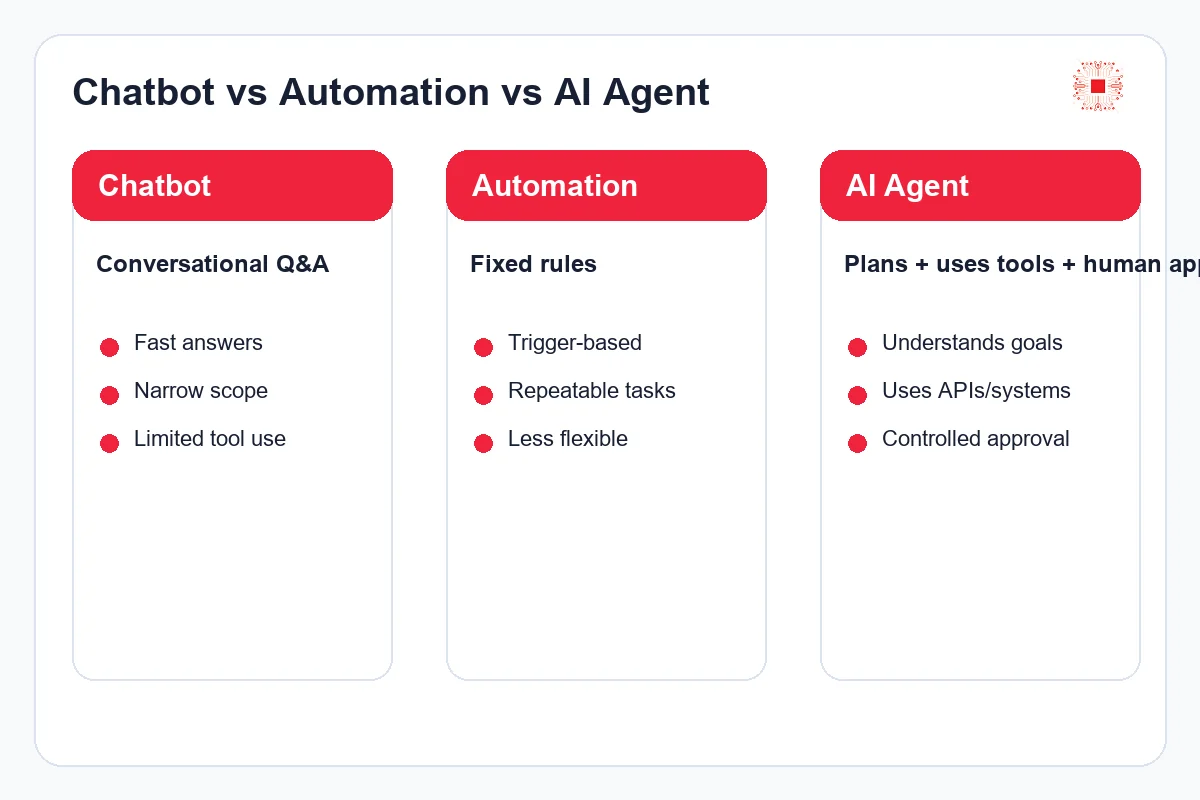
A chatbot is usually designed for question answering. Traditional automation follows fixed rules: if condition A happens, perform action B. An AI Agent sits between intelligence and operations. It can interpret context, choose the next step, call the right tool and stop for human approval when risk is high. Businesses should not treat AI Agents as a magic replacement for staff. The right model is to let AI handle structured work while humans keep responsibility for decisions, approvals and exceptions.
In a real SME environment, this area should have an owner, review frequency, acceptance evidence and performance metric. If it remains only an idea, the AI Agent may look impressive in a demo but fail to operate reliably.
This section should also be documented in the operating handbook: goal, data used, approval owner, risk if the Agent fails and acceptance evidence. With clear documentation, the business can train new staff, review the Agent periodically and scale it without depending on one person’s memory.
Chatbot vs Automation vs AI Agent Comparison
The table below helps businesses choose the right tool for the right problem. Not every process needs an AI Agent; sometimes a chatbot or fixed automation is enough.
| Criteria | Chatbot | Automation | AI Agent |
|---|---|---|---|
| Main goal | Q&A and guidance | Repeatable task automation | Context-aware process execution |
| How it works | Conversational response | Fixed rules | Plans, uses tools and asks for approval |
| Best fit | FAQ, knowledge lookup | Reminders, data sync | Tickets, reports, data checks, multi-step tasks |
| Main risk | Wrong or incomplete answers | Rigid rules and poor exception handling | Data access and incorrect action without governance |
If the process only needs information retrieval, a chatbot may be enough. If the process has multiple steps, multiple systems and controlled outcomes, an AI Agent becomes more relevant.
Which Workflow Should an SME Start With?
The first AI Agent use case should have clear data, repeated input, measurable output and controllable risk. Good examples include sales report summaries, IT ticket classification, SLA reminders, form data checking, draft customer follow-up emails, meeting summaries or order list reconciliation. The business should avoid starting with vague processes, high-value financial decisions or legal judgment unless human approval and audit logs are already designed into the workflow.
In a real SME environment, this area should have an owner, review frequency, acceptance evidence and performance metric. If it remains only an idea, the AI Agent may look impressive in a demo but fail to operate reliably.
This section should also be documented in the operating handbook: goal, data used, approval owner, risk if the Agent fails and acceptance evidence. With clear documentation, the business can train new staff, review the Agent periodically and scale it without depending on one person’s memory.
Practical Benefits for SMEs
The biggest benefit of an AI Agent is not only time savings. It can reduce dependence on a few people who hold process knowledge, reduce manual data-entry errors, speed up customer response and make reporting more consistent. When designed correctly, an AI Agent can turn work that currently happens across chat, email, spreadsheets and internal software into a workflow with status, approval, logs and reporting. That makes operations easier to scale without adding headcount linearly.
In a real SME environment, this area should have an owner, review frequency, acceptance evidence and performance metric. If it remains only an idea, the AI Agent may look impressive in a demo but fail to operate reliably.
This section should also be documented in the operating handbook: goal, data used, approval owner, risk if the Agent fails and acceptance evidence. With clear documentation, the business can train new staff, review the Agent periodically and scale it without depending on one person’s memory.
Risks to Control Before Implementation
AI Agents create risk when they receive too much access, use unclassified data, do not log actions or perform sensitive actions without approval. Common risks include exposing internal data, updating systems incorrectly, sending unapproved content, misunderstanding a request or producing reports without verifiable sources. Every Agent therefore needs a defined data scope, tool permission, automation level and stop condition. Governance is not an optional add-on; it is part of the design.
In a real SME environment, this area should have an owner, review frequency, acceptance evidence and performance metric. If it remains only an idea, the AI Agent may look impressive in a demo but fail to operate reliably.
This section should also be documented in the operating handbook: goal, data used, approval owner, risk if the Agent fails and acceptance evidence. With clear documentation, the business can train new staff, review the Agent periodically and scale it without depending on one person’s memory.
Safe AI Agent Implementation Checklist
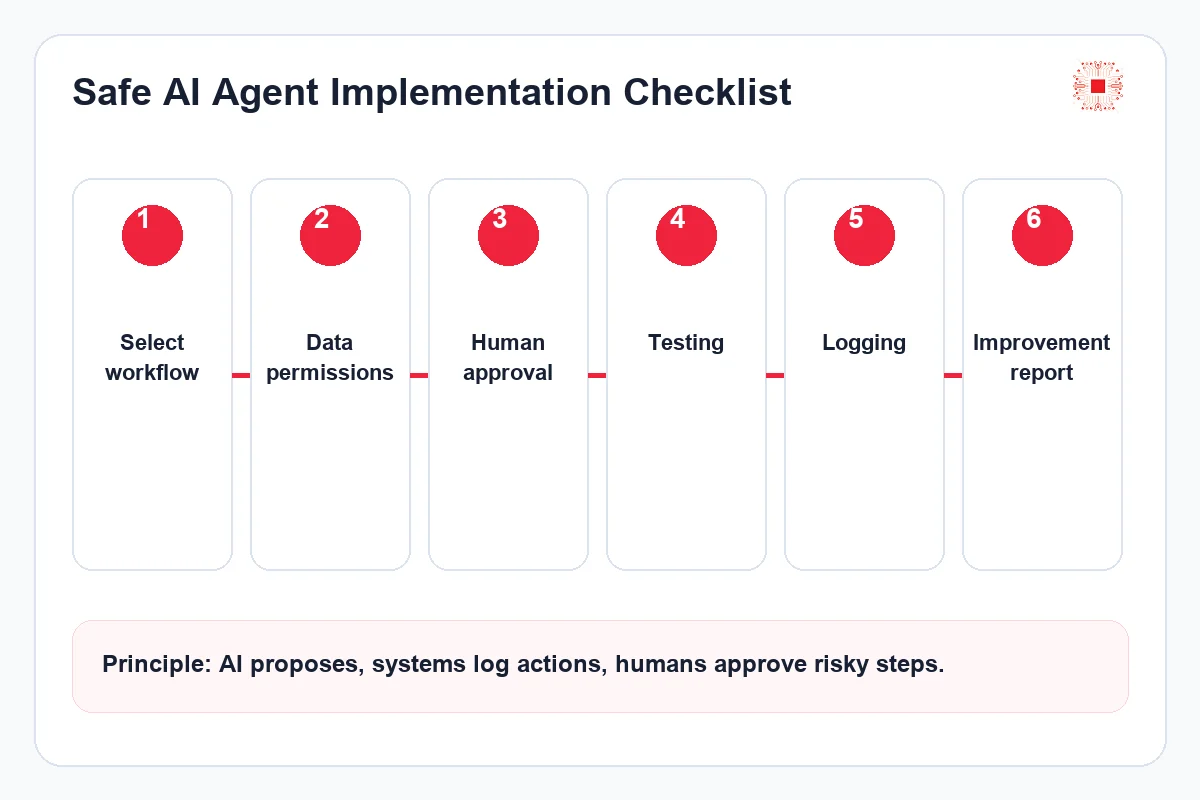
A minimum checklist should include selecting the right workflow, describing input and output, classifying data, defining access rights, designing human approval, testing with sample data, logging actions, measuring error rate and improving iteratively. The business also needs to know who owns the process, who approves the result, who is responsible when the Agent behaves incorrectly and when the Agent should be paused. Without these controls, the project may remain an interesting experiment but fail in real operations.
In a real SME environment, this area should have an owner, review frequency, acceptance evidence and performance metric. If it remains only an idea, the AI Agent may look impressive in a demo but fail to operate reliably.
What Systems Can an AI Agent Integrate With?
AI Agents create clearer value when connected to business systems such as CRM, helpdesk, email, Google Workspace, Microsoft 365, Odoo, website forms, databases or internal reports. However, deeper integration requires stronger control. It is usually safer to begin with read-only access, draft creation or recommended actions. Write access should be opened gradually after testing, logging and acceptance criteria are proven.
In a real SME environment, this area should have an owner, review frequency, acceptance evidence and performance metric. If it remains only an idea, the AI Agent may look impressive in a demo but fail to operate reliably.
This section should also be documented in the operating handbook: goal, data used, approval owner, risk if the Agent fails and acceptance evidence. With clear documentation, the business can train new staff, review the Agent periodically and scale it without depending on one person’s memory.
How to Measure ROI and Effectiveness
AI Agent ROI should be measured by saved time, fewer errors, faster response, correct ticket routing, on-time reporting and reduced manual dependency. It should not be measured only by chat volume. A useful Agent improves a real workflow, produces before-and-after evidence and earns internal user adoption. If the Agent creates more review work, correction work or explanation overhead, the design needs to be improved before scaling.
In a real SME environment, this area should have an owner, review frequency, acceptance evidence and performance metric. If it remains only an idea, the AI Agent may look impressive in a demo but fail to operate reliably.
This section should also be documented in the operating handbook: goal, data used, approval owner, risk if the Agent fails and acceptance evidence. With clear documentation, the business can train new staff, review the Agent periodically and scale it without depending on one person’s memory.
How IT Systems Implements AI Agents
IT Systems usually starts by reviewing workflow and data, then selecting a use case with high value and controlled risk. The next steps are Agent workflow design, access rights, human approval, logs, acceptance criteria and handover documentation. For SMEs, a phased approach is safer: pilot one workflow, measure results, improve it and then expand to another team. This helps management see value before committing to a larger investment.
In a real SME environment, this area should have an owner, review frequency, acceptance evidence and performance metric. If it remains only an idea, the AI Agent may look impressive in a demo but fail to operate reliably.
This section should also be documented in the operating handbook: goal, data used, approval owner, risk if the Agent fails and acceptance evidence. With clear documentation, the business can train new staff, review the Agent periodically and scale it without depending on one person’s memory.
Governance Framework Before Approval
Before implementation, management should review three questions. Which team will be affected if the workflow fails? Who approves the output and owns acceptance testing? What evidence will be reviewed monthly to confirm that the Agent is working correctly? If these questions cannot be answered, the project should not be granted broad automation rights yet.
The governance framework should separate immediate controls from later optimization. Data permissions, human approval and action logs are baseline requirements. Prompt refinement, advanced dashboards or deeper automation can come later after the Agent is stable. This phased approach keeps SME budgets realistic and reduces the risk of automating too much too early.
| Control Area | Question to Answer | Evidence |
|---|---|---|
| Data | What can the Agent read or write? | Data source and permission list |
| Human approval | Which step requires approval? | Approval workflow and owner |
| Logs | Can actions be traced? | Action log and monthly report |
Related Services from IT Systems
If your company wants to implement an AI Agent, IT Systems can begin with a workflow and data assessment. The goal is to identify use cases with clear ROI, risks that need control, systems that require integration and human-approval points that must be designed before launch.
- AI Agent services for business
- Report Agent for business reporting
- Chat Agent for internal and customer support
This section should also be documented in the operating handbook: goal, data used, approval owner, risk if the Agent fails and acceptance evidence. With clear documentation, the business can train new staff, review the Agent periodically and scale it without depending on one person’s memory.
Frequently Asked Questions
Does an AI Agent replace employees?
It should not be implemented as a full replacement. AI Agents are best used to support repetitive tasks, draft outputs, check data and recommend actions while humans approve risky steps.
Does a small business need an AI Agent?
It may, if the business has repetitive manual work, time-consuming reports or slow ticket handling. The safer approach is to start with one small use case, measure results and then expand.
Is an AI Agent safe for internal data?
Safety depends on access design, data classification, logs and human approval. The Agent should not receive broad permissions at the start.
Can IT Systems implement AI Agents with a controlled process?
Yes. IT Systems can assess workflows, design the Agent, integrate tools, test outputs, hand over documentation and support improvement after launch.
Department-Level AI Agent Use Cases
A practical way to start is to design AI Agents by department instead of building one broad Agent for the whole company. In sales, an Agent can read website forms, classify customer needs, draft follow-up emails and remind staff to respond within SLA. In accounting, an Agent can check missing documents, prepare internal reminders and summarize receivables as a draft report. In IT or helpdesk, an Agent can classify tickets, suggest troubleshooting steps and produce a weekly report of recurring issues.
The key is that each department needs a separate data scope and permission model. A sales Agent does not need salary data. An accounting Agent does not need CRM write access. An IT Agent may need technical logs but should not change sensitive configuration without approval. Department-level separation makes risk easier to control and allows management to measure each use case before expanding.
| Department | Suitable Use Case | Approval Point |
|---|---|---|
| Sales | Lead classification and follow-up reminders | Customer-facing email and high-value opportunities |
| Accounting | Document checks and receivable reminders | Financial data and sensitive reports |
| IT/Helpdesk | Ticket classification and suggested fixes | Configuration changes and access rights |
Operating Model After the Pilot
After a successful pilot, the business should define how the Agent will be operated monthly. This includes who reviews logs, who approves prompt or workflow changes, how failed actions are handled and which metric proves that the Agent is still useful. Without an operating model, an Agent can slowly drift away from the real process as users, software and business rules change.
The monthly review does not need to be complex. It can include number of tasks processed, number of human approvals, error cases, time saved, user feedback and suggested improvements. This gives management a simple view of whether the AI Agent should be expanded, adjusted or paused. It also prevents the project from depending only on the enthusiasm of the initial implementation team.
Need to Identify the Right Workflow for an AI Agent?
IT Systems can review your workflows, data, current software, risk level and human-approval points before recommending an AI Agent scope. Your business receives prioritized use cases, integration scope, security requirements, acceptance criteria and a phased implementation plan.
This is useful when the business wants to automate reporting, customer support, ticket handling, data entry, data checking or cross-system operations while keeping risk under control.
This section should also be documented in the operating handbook: goal, data used, approval owner, risk if the Agent fails and acceptance evidence. With clear documentation, the business can train new staff, review the Agent periodically and scale it without depending on one person’s memory.