Short answer: To select a short-throw projector for a meeting room or classroom, decide the usable image width, measure the available distance from the lens to the projection surface, then check the throw ratio and distance chart for the exact projector and lens. As a first-pass estimate, throw distance ≈ throw ratio × image width. Room area, screen diagonal, or a “short throw” label alone cannot confirm installation fit.
This guide addresses projector placement. If your team is still choosing between a projector and a flat-panel display, read our meeting-room comparison. Once projection is the preferred route, the Panasonic projector solutions guide covers light, connections and installation scope.
Where is throw distance measured?
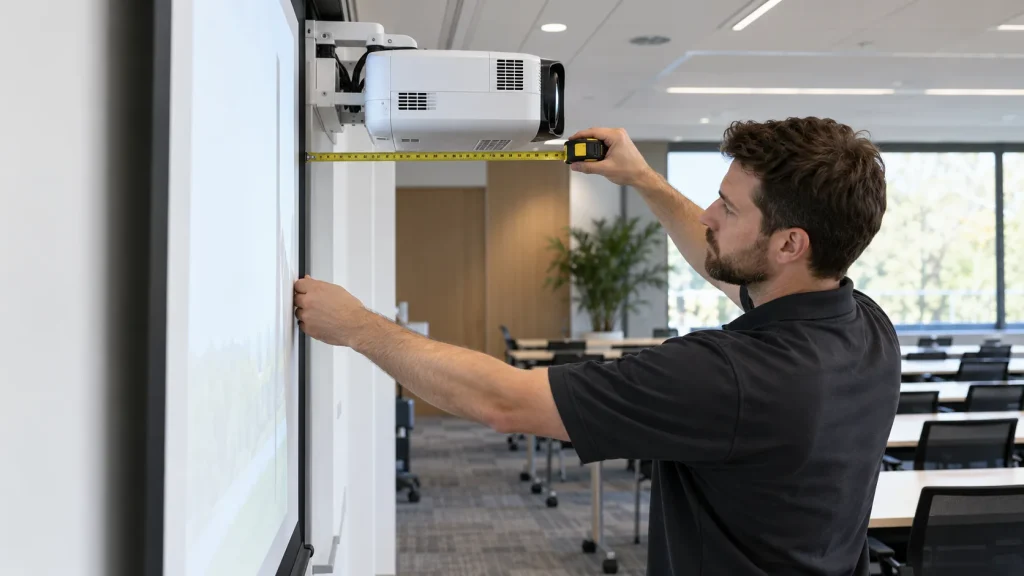
Throw distance runs from the projector lens to the image surface, not from the projector’s rear edge, mounting bracket or audience. Measure the intended lens position; a ceiling installation must allow for the body’s depth and mount position. Then measure the usable width of the image. Throw ratio is the relationship between those measurements. Some lenses offer a range through optical zoom; a fixed lens may have a nominal single ratio.
Do not confuse throw distance with viewing distance, which runs from the audience to the image. A projector can fit physically while text remains unreadable from the back row. Enlarging the image may also reduce brightness per unit of screen area and expose an uneven wall.
A practical first-pass calculation
- Confirm aspect ratio: identify whether the usual content and intended display use 16:9, 16:10 or another format.
- Measure image width: allow for the board, doors, speakers, wall edges and a practical viewing height.
- Measure possible lens positions: record the shortest and longest usable lens-to-screen distance, not merely the room depth.
- Screen candidate throw ratios: divide the available distance by target image width. Check the model-specific calculator or distance table, zoom range, image offset and mount constraints.
- Test real content: inspect slides and spreadsheets from the farthest seat under typical room lighting, then remeasure before drilling.
Illustration only, not a Panasonic model specification: a 100-inch 16:9 image is about 2.21 m wide. At an assumed 0.5:1 throw ratio, the initial distance is approximately 1.11 m; at 1.5:1, approximately 3.32 m. Actual placement depends on the specific lens, zoom and installation tolerance. The Panasonic throw-distance calculator treats its results as estimates, so leave room for verification on site.
Standard, short or ultra-short throw?
| Option | When to consider it | What to verify |
|---|---|---|
| Standard throw | There is enough room depth to place the projector clear of presenters and traffic | Actual throw, shadows, ceiling position and cable route |
| Short throw | A shallow room or classroom needs a larger image with fewer presenter shadows | Model ratio, supported image size, offset and compatible mount |
| Ultra-short throw | The projector must sit very close to the board or screen | Surface flatness, precise alignment, mounting system and image limits |
These are use-case categories, not universal numeric thresholds across brands. Closer is not automatically better: a very close installation may complicate maintenance, create a collision risk or reveal distortion on an uneven wall. Digital keystone can make a modest adjustment, but it should not substitute for the correct lens and mounting position.
Three common room scenarios
A shallow meeting room
Measure from the projection wall to the nearest viable lens position, then open the actual slides and spreadsheets at the back seats. Only shortlist a short-throw model if the desired image is not achievable at the available distance. Also inspect windows, direct light on the surface, video-meeting camera position, power and signal cabling.
A classroom with a teaching board
Minimize presenter shadows and glare toward the teacher. Identify how much board must remain writable, image height and the nearest student position. Ultra-short throw may be useful, but it needs a flat surface, careful alignment and model-specific board/screen compatibility. Do not assume that every such projector offers interactive touch functions.
A long training room
Throw distance is only one constraint. Check text size at the back, ambient light, screen size and viewing angles. A standard-throw projector or more than one display might be more appropriate than a short-throw installation; decide using actual presentation material.
Measurements to send with a quotation request
- Room dimensions, usable image width/height and primary content aspect ratio.
- The shortest and longest viable lens-to-screen distance, plus photos of the wall and ceiling.
- Desk, board, window, lighting and presenter positions, including the brightest usual operating time.
- Source devices, signal cables, audio, power and any wireless-sharing requirement.
- Expected usage hours, maintenance needs, acceptance criteria and warranty scope to specify in the quote.
IT Systems can use these measurements to advise on a suitable configuration and survey/install after agreeing the scope. A useful quotation distinguishes the projector model, screen, mount, cables, other materials and installation work. A projector-only price is not the price of a complete fitted system.
Frequently asked questions
My room is 3 m deep. Can I immediately choose short throw?
No. Room depth is not the lens-to-screen distance. First confirm image width, workable mounting position and the specific model’s throw range.
Can I multiply a 100-inch diagonal by the throw ratio?
No. Throw ratio uses image width. A 100-inch 16:9 image is approximately 2.21 m wide; a different aspect ratio produces a different width.
Will keystone fix an incorrect throw distance?
No. Keystone adjusts image geometry within limits and can affect clarity. The model must still support the desired image size at the actual lens position.
Is a short-throw projector necessarily bright enough for a classroom?
No. Brightness must be considered with ambient light, screen size, content and surface. Test under real operating conditions rather than relying on the throw category.
Need to confirm placement before ordering? Send IT Systems a room sketch, photos of possible mounting points and target image size. Explore our Panasonic solution guide, see the Panasonic projector catalogue or request a survey. Call +84 28 3995 0359 for a direct discussion.
Technical references: Panasonic Throw Distance Calculator; Panasonic Optional Lens Guide; Epson Throw Distance and Positioning Guide. Final figures must be checked against the datasheet for the offered model and lens.