In the age of ever-evolving digitalization, applying IT tips to daily work not only helps to optimize time, but also significantly improves work performance. From using project management tools, optimizing time, to building flexible schedules and adopting cloud technology, each tip offers practical benefits. Let’s explore the 19 IT tips below to make your daily work lighter and more efficient than ever!
Tip 1: Use an effective project management tool
Project management tools are a great arm for anyone who wants to track and coordinate work effectively. Imagine you’re trying to build a house without complete drawings – things will get messed up. The project management tool is that drawing, helping you control every little detail well.
With popular platforms like Trello, Asana, or Monday.com, you can easily plan in detail, divide tasks, and track the progress of your entire team. Trello, for example, allows you to use Kanban boards to visualize the progress of each task, while Asana helps you create task lists and track things through Gantt charts. Monday.com stands out with the ability to adjust the dashboard interface according to the specific needs of each project.
Benefits of using a project management tool:
- Clear task assignment: These tools allow you to assign detailed tasks to each team member, define deadlines, and ensure everyone is on top of their work.
- Track project progress: Use charts and reports from the tool to help you grasp the project progress in real time, timely detect problems that need to be fixed.
- Effective internal communication: Some tools that integrate chat or comment functions help reduce emails and speed up the process of exchanging information.
- Easy Planning: It’s easy to plan in detail from the beginning to the end of the project, giving you a clear view of your goals and timeline.
For example, if you’re leading a marketing project with many smaller campaigns, using Asana will help you break down your campaigns into smaller tasks, assign them specifically to each member, and track progress clearly.
By focusing on the right project management tool, you can not only improve your productivity, but also create a streamlined, disciplined, and productive work environment.

Use an effective project management tool
Tip 2: Optimize time with the Pomodoro technique
Imagine yourself as a sculptor, every speck of Pomodoro will help you create the perfect piece from the original rough stone. The Pomodoro technique is a time management method developed by Francesco Cirillo in the late 1980s to keep you focused and excited at work.
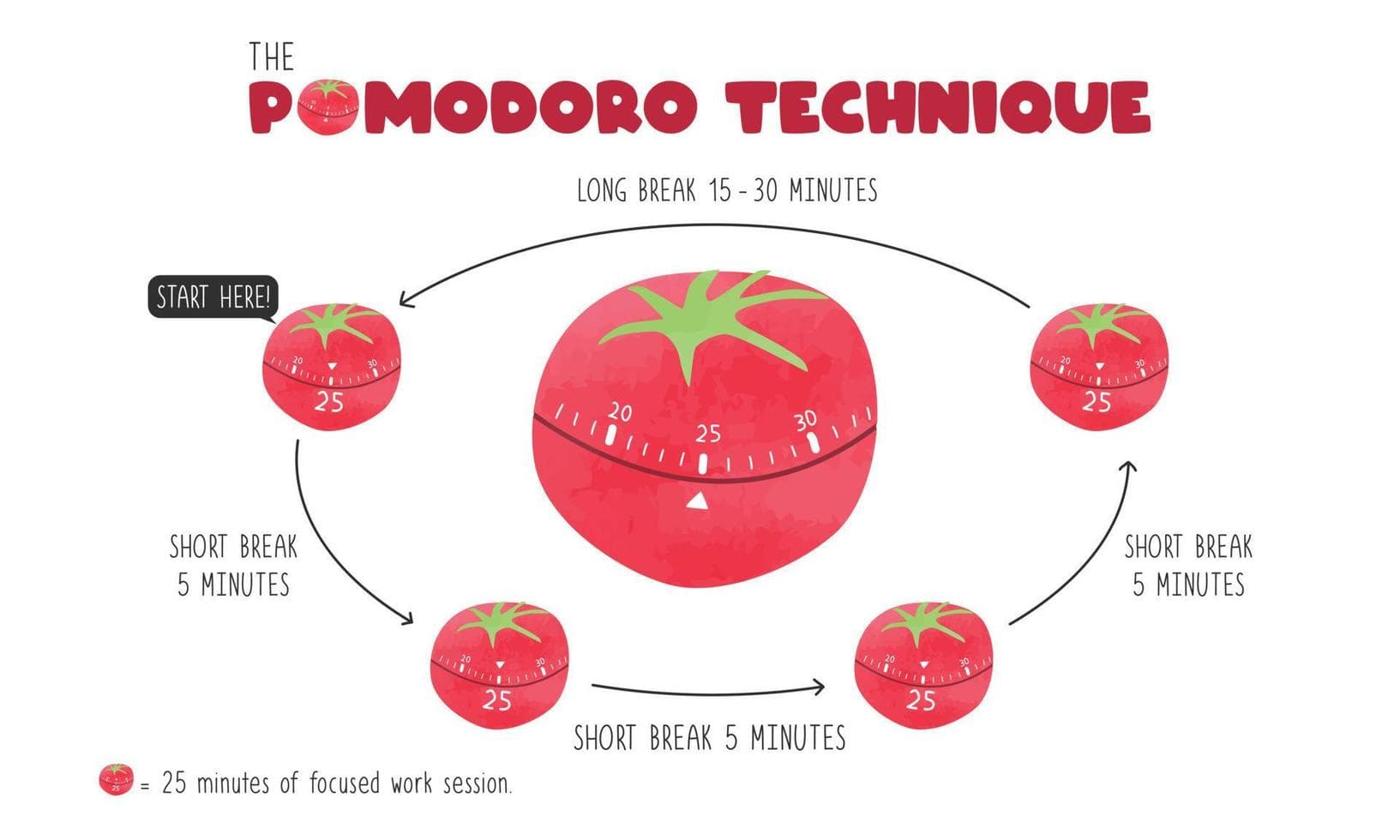
The simple 25/5 principle of the Pomodoro technique helps you divide your work time into 25-minute Pomodoro intervals, alternating with 5 minutes of rest. After every 4 Pomodoros, you will have a longer break (15-30 minutes) to recharge.
How to perform the Pomodoro technique:
- Follow the 25/5 principle: Set the clock for 25 minutes to work continuously without distractions. Then, take a 5-minute break. Repeat this cycle 4 times and then take longer breaks (15-30 minutes).
- Choose a specific task: Before starting each Pomodoro, choose a clear task to focus on, like completing a report or drafting an email.
- Minimize distractions: For 25-minute periods, keep your work environment quiet, turn off notifications from your phone and other apps to maximize focus.
- Record Progress: Use a note or tracking app to record how many Pomodoros have been completed. This not only controls the time, but also creates a sense of accomplishment.
- Adjust as needed: If you find it difficult to concentrate for 25 minutes, you can try adjusting the time or practicing working longer and then taking longer breaks later. Some people find it effective with a 50-10 structure.
The Pomodoro technique is like a compressed countdown, helping to maximize your power and creativity in every moment. When you focus entirely on one thing for a short period of time, you will realize that your productivity and quality of work improve significantly.
Optimize time with the Pomodoro technique
Tip 3: Apply the 2-minute rule at work
The 2-minute rule is an effective time management method that encourages completing small tasks immediately if you can do them within 2 minutes. Imagine you are stacking a bridge from small bricks, each brick for 2 minutes will help complete that bridge in a sustainable and fast way.
To apply the 2-minute rule:
- Handle small tasks immediately: If the task only takes less than 2 minutes, do it right away to avoid leaving it for work later. For example, answering emails, cleaning your desk, or organizing documents.
- Create a habit from small things: By immediately doing what can be done in 2 minutes, you build positive habits and fight procrastination. For example, if you intend to exercise, start with simple movements for 2 minutes.
- Combine with bigger work: Doing things right away both motivates you and makes it easier for you to start bigger jobs after getting into the habit of working fast.
- Make a to-do list in 2 minutes: Make a list of tasks that can be completed quickly and take advantage of the free time to solve them.
The 2-minute rule helps you “cut” the small thorns in your daily work path, so that you can reach your destination more smoothly.

Apply the 2-minute rule at work
Tip 4: Take advantage of automation software
In the context of ever-evolving technology, leveraging automation software can help you save time and improve productivity. Imagine having a “virtual assistant” who handles daily tasks, and it will be easier for you to focus on more important tasks.
Ways to leverage automation software:
- Automatic scheduling: Use tools like Google Calendar to automatically schedule meetings and reminders.
- Email automation: Use email templates and automated email sending functionality in software like Mailchimp to handle bulk notifications.
- Task management: Use project management software like Trello or Asana to automate work progress tracking and task assignment.
- Automated invoicing: Use accounting software to automate invoicing and financial management.
- Online tool integration: Leverage Zapier or IFTTT to connect different applications, which helps automate workflows.
Imagine you’re running a boat on the river of work, the automation software will be a smooth, circulating flow and help you go faster to your destination.
Tip 5: Build a flexible work schedule
Building a flexible work schedule is important for work-life balance. A flexible schedule allows you to adjust your time and work priorities according to your personal needs and circumstances. Imagine you’re tuning a guitar, each string stretched flexibly to create the perfect sound.
How to build a flexible work schedule:
- Evaluate your personal time: Identify the times when you feel most productive at work and plan for important tasks during these times.
- Use a scheduling tool: Apps like Google Calendar or Trello can help you keep track of tasks and events. You can create reminders so you don’t miss a deadline or personal event.
- Create buffer periods: Try to leave a blank amount of time in your schedule for unexpected situations. This helps you adjust without stress.
- Prioritize work: Set important and urgent tasks and implement them first, followed by less important tasks. This helps optimize working time.
- Adapt to the situation: Sometimes, you need to adjust your work schedule to accommodate changes in your personal or professional life. Flexibility in time management is key to maintaining high performance.
Flexible work schedules not only help you ensure your productivity, but also provide a sense of freedom and comfort in your daily work.
Tip 6: Use note-taking technology to enhance focus
Using note-taking technology can help you consolidate information and improve your ability to concentrate at work. Imagine you’re assembling a collage from thousands of small pieces, note-taking technology will help you arrange and preserve each piece so that it fits together.
How to use note-taking technology effectively:
- Choose the right note-taking tool: Apps like Evernote, OneNote, or Notion allow you to organize your notes and information in a way that makes it easy for you to access and search.
- Systematize notes: Use labels and folders to organize notes by topic, making it easy to search when you need them.
- Take direct notes while studying: When participating in meetings or classes, jotting down important information immediately will help consolidate knowledge and focus better.
- Summarize and refresh notes: Periodically review and summarize your notes. This not only reinforces the information, but also helps you re-identify important content.
- Create interactive notes: Use images, videos, or audio in notes to promote learning and keep your attention undistracted.
Note-taking technology is like a mobile “bookcase”, helping you to store and access information easily and quickly.

IT Tips – Use note-taking technology to enhance focus
Tip 7: Apply cloud technology to store data
Applying cloud technology in data storage is becoming an inevitable trend, especially in Vietnam, where the cloud service market is expected to reach 1.03 billion USD by 2028. Cloud technology not only helps reduce investment costs for storage infrastructure, but also enhances the ability to access data from anywhere and ensures better security.
Top Applications and Companies:
- CMC Corporation, Viettel IDC and VNG Cloud: These companies are investing heavily in building data infrastructure. The use of cloud storage solutions allows businesses to optimize workflows, store data securely, and cater to big data analytics activities.
- Google Drive, Dropbox, OneDrive: These cloud storage platforms offer mass storage solutions, cross-device syncing, and quick information sharing.
The use of cloud services not only helps to secure data but also brings convenience and efficiency in accessing and managing information from anywhere.
Tip 8: Communicate effectively through technology
For effective communication in a technology-enabled work environment, online communication tools such as Zoom, Microsoft Teams, and Slack are very popular. The use of these platforms enhances interoperability between team members, promotes collaboration, and improves workflows.
Benefits of the tools:
- Zoom: This online meeting software makes it possible to connect remotely and hold uninterrupted meetings. Features like screen sharing and meeting recording make it easy to keep and share content.
- Microsoft Teams: Integrated with Office 365, Microsoft Teams allows you to manage your work, organize meetings, and communicate in a single platform.
- Slack: This software helps to communicate quickly via messages, organize chat channels by topic, and integrate with other work tools to optimize workflows.
In the context of the strong digital transformation taking place in Vietnam, the use of these communication tools not only helps reduce meeting time but also facilitates information sharing, helping to make quick and accurate decisions.

Communicate effectively through technology
Tip 9: Secure work information with new technology
Information security in the workplace is a very important factor in business management. The use of new technology can help enhance security. Imagine having a “virtual guardian” by your side at all times, ensuring that all your important information is safe at all times.
Effective information security methods:
- Use password management software: This tool helps employees keep their login information safe and easy, avoiding the risks of revealing passwords due to taking notes or reusing passwords.
- Data encryption: Using encryption tools helps protect sensitive information from unauthorized access. This is especially important for data that is shared via email or stored in the cloud.
- Ensure regular software and security system updates: Regular updates will help patch security bugs and enhance prevention against external intrusion elements.
- Train employees on information security: Provide information and guidance to employees on information security practices, including identifying threats and how to handle them.
By adopting state-of-the-art security technology, you can rest assured that your work information is always safe and secure.
Tip 10: Create a digital work environment to maximize positivity
The digital working environment not only enhances work efficiency but also stimulates positive working spirit among employees. Think of your office as a “digital garden” where each employee is a green tree that grows together and creates a fresh atmosphere.
Ways to create an effective digital work environment:
- Use teamwork apps: Platforms like Slack or Microsoft Teams help employees communicate and coordinate work more effectively.
- Optimize workflows with technology: Adopting project management software like Trello or Asana makes it easier to track project status and tasks, thereby improving the efficiency of the whole team.
- Create a virtual workspace: Online meetings via Zoom or Google Meet can help keep members connected while ensuring positive energy and engagement.
- Encourage employees to share successes and ideas: Create a platform where employees can easily share achievements and suggestions for improvement, helping to build a positive work environment and encourage creativity.
A digital work environment allows you and your colleagues to be more productive and creative, and promotes job satisfaction and commitment.
Tip 11: Take advantage of downtime to study
Downtime is free time that we often miss, like when waiting for the bus, waiting in line, or sitting in a coffee shop. Taking advantage of downtime to study not only enriches you intellectually, but also improves your career skills.
How to make effective use of downtime:
- Listen to podcasts or audiobooks: You can use your waiting time to listen to podcasts or audiobooks about topics that interest you or are related to work.
- Read short materials: Bring books, newspapers, or study materials to read when you have downtime.
- Do brain exercises: Use learning or entertainment apps such as quizzes and puzzles to train your brain.
- Learn a foreign language: Use downtime to learn new vocabulary, practice pronunciation or listen to music and news in a foreign language.
When you take advantage of your downtime to study, you will find that time becomes more useful and dynamic, helping you to continuously improve your knowledge without compromising your main time budget.
Tip 12: Practice mindfulness to reduce stress
Mindfulness, also known as mindfulness, is a practice that aims to enhance concentration and reduce stress. Incorporating mindfulness into your daily routine helps you balance your mind and improve your productivity.
How to practice mindfulness:
- Mindful breathing: Every day, spend at least 5-10 minutes focusing on your breathing, observing and feeling each breath, helping your mind to relax.
- Mindfulness Meditation: Practice meditation for 15-20 minutes a day, focusing on the present moment and eliminating negative thoughts.
- Short mindfulness exercises: During work, take a few minutes to do short exercises such as monitoring your breath, feeling the taste of coffee, which helps regenerate energy.
- Reduce technology devices: Turn off or silence electronic devices from time to time to reduce distractions and focus on your mind.
Practicing mindfulness not only helps you reduce stress and increase focus, but it also brings a sense of happiness and comfort in your daily work.
Tip 13: Use automation in everyday software
Nowadays, most software has built-in automation, which saves time and improves work efficiency. Imagine you have a “night owl” machine, always working hard while you rest or focus on other important tasks.
How to use automation effectively:
- Gmail and Outlook: Take advantage of email automation to schedule sends, organize your inbox, and create autoresponders.
- Zapier and IFTTT: Connect different apps and automate tasks between them, like saving email attachments to Dropbox, creating tasks in Trello when receiving an email from someone special.
- Excel: Use formulas and macros to automate calculations and update data without manual work.
- Slack: Use bots and automated integrations to send reminders and update work status from project management software.
By using automation, you will feel like you have an additional “virtual assistant” that helps reduce the burden of daily work, help increase productivity, and avoid duplicate tasks.
Tip 14: Re-energize with daily fitness
It is undeniable that a healthy body will bring mental refreshment and enhance work performance. Daily fitness activities are a great way to boost your health and boost your morale.
How to integrate fitness into your daily work:
- Walk during lunch breaks: Spend 15-30 minutes walking, breathing fresh air, helping to regenerate energy.
- Perform office exercises: Lifting and pushing your hands, stretching your muscles right at your desk every hour helps improve blood flow and reduce stress.
- Use a bike or walk to work: If possible, instead of riding a motorcycle or car, try cycling or walking to improve your health and save money on fuel.
- Participate in yoga classes or exercises*daily: Yoga not only helps to increase muscles but also helps the mind to stay relaxed and highly focused.
Regular fitness activities will help you maintain your health, improve your spirits and increase your productivity, creating a solid foundation for long-term success.
Tip 15: Create an optimal workspace
Your workspace has a great influence on productivity and morale. A clean, comfortable, and neatly organized workspace will provide a pleasant feeling and enhance focus.
How to create an optimal workspace:
- Organize your desk: Make sure your desk is always clean, and the necessary documents and tools are neatly organized and easy to find.
- Create a green space: Leave a few small pots of ornamental plants and greenery to help create a comfortable space, reduce stress and increase productivity.
- Ensure adequate lighting: Use a table lamp or take advantage of natural light to work, avoid eye strain and stay awake.
- Create a quiet work area: If possible, create a quiet, low-noise space to enhance focus and productivity.
- Ensure an open space: Ensure an airy, pleasant workspace that helps to create a sense of comfort and focus on work.
Creating an optimal workspace not only helps you feel comfortable and comfortable, but also enhances focus and productivity in your daily work.
Tip 16: Take advantage of the “Eat That Frog” method
Brian Tracy’s “Eat That Frog” method is a very effective approach to preventing procrastination and focusing on the most important tasks. Imagine that every morning you have to eat a raw frog, doing the hardest thing first will help you get through the day’s homework with ease.
How to do the “Eat That Frog” method:
- Select the “frog” task: Identify the most important, most difficult task that you need to complete during the day.
- Do it first thing of the day: Make sure you start your day by completing the first “frog” task.
- Don’t procrastinate: Stop all other tasks and focus all your energy and time to complete this task.
- Make a daily plan: Each evening, plan for the next day and identify the “frog” task to be ready to do the next morning.
With the “Eat That Frog” method, you will feel strong and full of confidence when you have overcome the most difficult challenges in your daily work.
Tip 17: Use tracking tools to track work progress
Using a work progress tracking tool helps you know exactly where you stand in the process, helps you adjust your plan accordingly, and ensures that your goals are achieved.
Popular tracking tools:
- Toggl: This tool helps you track your working time and review time reports for adjustments.
- RescueTime: Automatically tracks activity on your computer, helping you know how much time you’ve spent on each task.
- Clockify: A free time tracking tool that helps you keep track of your working time and generate detailed reports.
- Harvest: Time tracking and invoice management software, helping you control work time and projects.
Using tracking tools helps you control your time, improve your work efficiency, and ensure you are always on schedule.

Use tracking tools to track work progress
Tip 18: Perform the GTD (Getting Things Done) technique
David Allen’s GTD (Getting Things Done) technique helps you organize and manage your work effectively, reducing stress and boosting productivity.
How to perform the GTD technique:
- Collect all tasks: Create a list of all your to-do tasks, from the smallest tasks to big projects.
- Handle each task: Classify tasks into categories such as: need to do immediately, assign to others, long-term projects.
- Make an action plan: Create a specific action list for each task and project.
- Tracking and Adjustments: Continuously monitor work progress and adjust plans to ensure on-time completion.
- Periodic Review: Periodically review task lists, adjust and eliminate unnecessary tasks.
GTD techniques help you maintain control and increase organization in your daily work, ensuring that every task is completed on time and efficiently.
Tip 19: Use the Kanban method to manage tasks
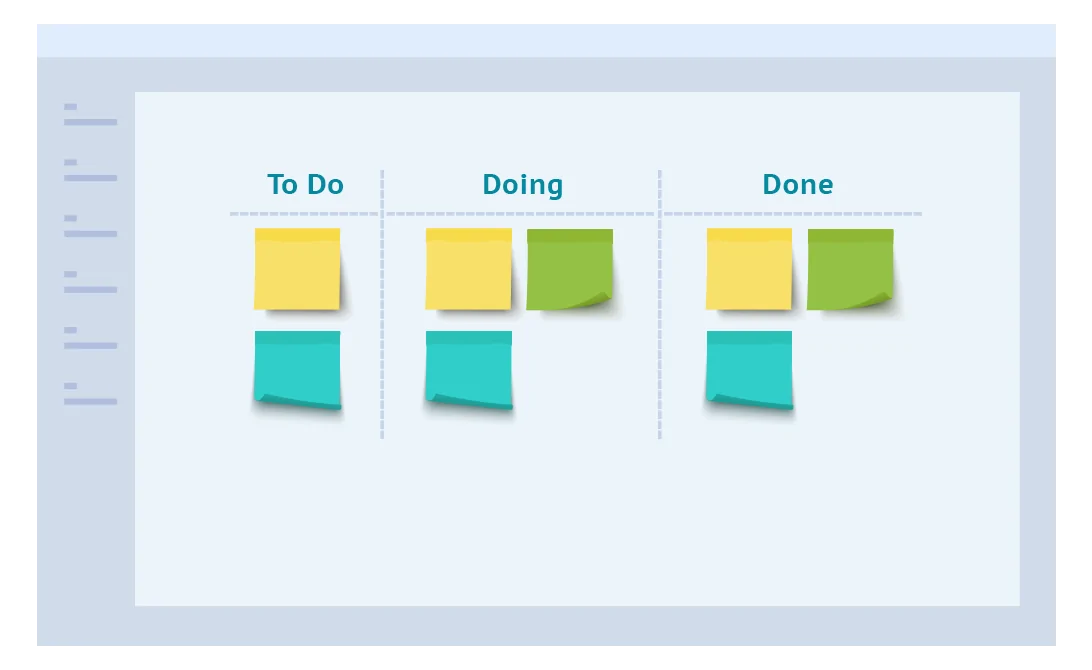
Kanban is an effective method of task management that helps you visualize progress and coordinate work flexibly.
To use the Kanban method:
- Create a Kanban board: Create a table divided into columns: To-Do, In Progress, Done.
- Add tasks to the board: Write tasks on cards and place them in the To-Do column.
- Move cards according to progress: When starting a task, move the card from the To-Do column to In Progress. When you’re finished, move the card to the Done column.
- Limit work in progress: Limit the number of cards in the In Progress column to avoid overload and ensure the quality of work.
- Track and adjust: Continuously track progress, adjust Kanban boards, and improve workflows.
The Kanban method helps you visualize your workflow, increase control, and ensure that every task is completed efficiently and on time.
Applying IT tips to your daily work will not only help you boost your performance, but it will also bring balance and satisfaction at work. With the support of technology and effective management methods, you will easily cope with any challenges and achieve success at work.
Use the Kanban method to manage tasks
Conclusion
Improving work productivity is not easy, but with the help of information technology, you can easily achieve this goal. From using effective project management tools, optimizing time with the Pomodoro technique, applying the 2-minute principle at work, to leveraging automation software and building flexible work schedules, applying these tips will help you boost your productivity and maintain balance at work. Don’t hesitate to take advantage of note-taking technology to enhance concentration, use cloud technology to store data, communicate effectively through technology, secure work information with new technology, and create a digital working environment to maximize positivity.
These tips will not only provide you with a solid foundation in managing your time and daily work, but they will also foster creativity, motivation, and commitment in the tasks you undertake. Once you master these tools and techniques, you’ll see a noticeable shift in the way you work and the results you achieve.
Contact Information for IT Systems Vietnam
IT SYSTEMS VIETNAM CO., LTD
IT Solutions – IT Department for Businesses
☎️ HOTLINE: 0283 9950 359
Email: contact@itsystems.com.vn
Website: https://itsystems.vn/
Facebook: https://www.facebook.com/ITSystems.VIETNAM
YouTube: https://www.youtube.com/@ITSYSTEMS
321/10 Phan Dinh Phung, Ward 15, Phu Nhuan District, Ho Chi Minh City.
House No. 22, Garden Villa, Vinh Hoang Urban Area, 431 Tam Trinh, Hoang Mai District, Hanoi.
Binh Duong Avenue, Phu Hoa, Thu Dau Mot, Binh Duong.
FAQ
When should a business ask IT Systems for support?
Ask for support when the issue affects users, business data, security, licensing compliance, service availability or daily operations. A short technical review often prevents repeated incidents and hidden costs.
Can IT Systems help review the current environment before proposing a solution?
Yes. IT Systems can review the current setup, identify risks, map the issue to the right service scope and recommend a practical next step for your business.
Does this topic connect to ongoing IT operations?
In most cases, yes. Problems around software, cloud, endpoint, network, backup or security should be connected to a broader IT operations plan instead of being handled as isolated incidents.
Need help applying this to your business?
IT Systems Vietnam can help assess the issue, recommend the right service path and support implementation for your team.