


ASSESS / DESIGN / DEPLOY
Business IT system design and deployment
From a new office to a multi-site environment, IT Systems assesses the current setup, designs the network and data platform, deploys in controlled stages, and hands over documentation so your business remains in control.

What does building a business IT system involve?
It is a project to define user and data needs, then design connectivity, servers or cloud, storage, access, security, backup and handover. The outcome is more than working hardware: it includes diagrams, an access matrix, test results, business-owned accounts and an operating plan after acceptance.
This page covers design, deployment or upgrades with a defined scope and acceptance criteria. Ongoing ticket handling, maintenance and monthly administration belong to managed IT services or IT outsourcing.
When should a business reassess its IT setup?
Opening an office or branch
Plan LAN/Wi-Fi, resilient internet, secure connectivity, user accounts and shared data storage from the outset.

Files are scattered
Data sits on multiple devices, with no clear master copy, owner or change history.

Access is hard to control
People change roles or leave while old permissions remain; shared administrator accounts make accountability difficult.

Recovery is uncertain
Servers or NAS devices are full, backups have never been restored in a test, and configuration or license records are incomplete.
Design and deployment scope
Network and connectivity
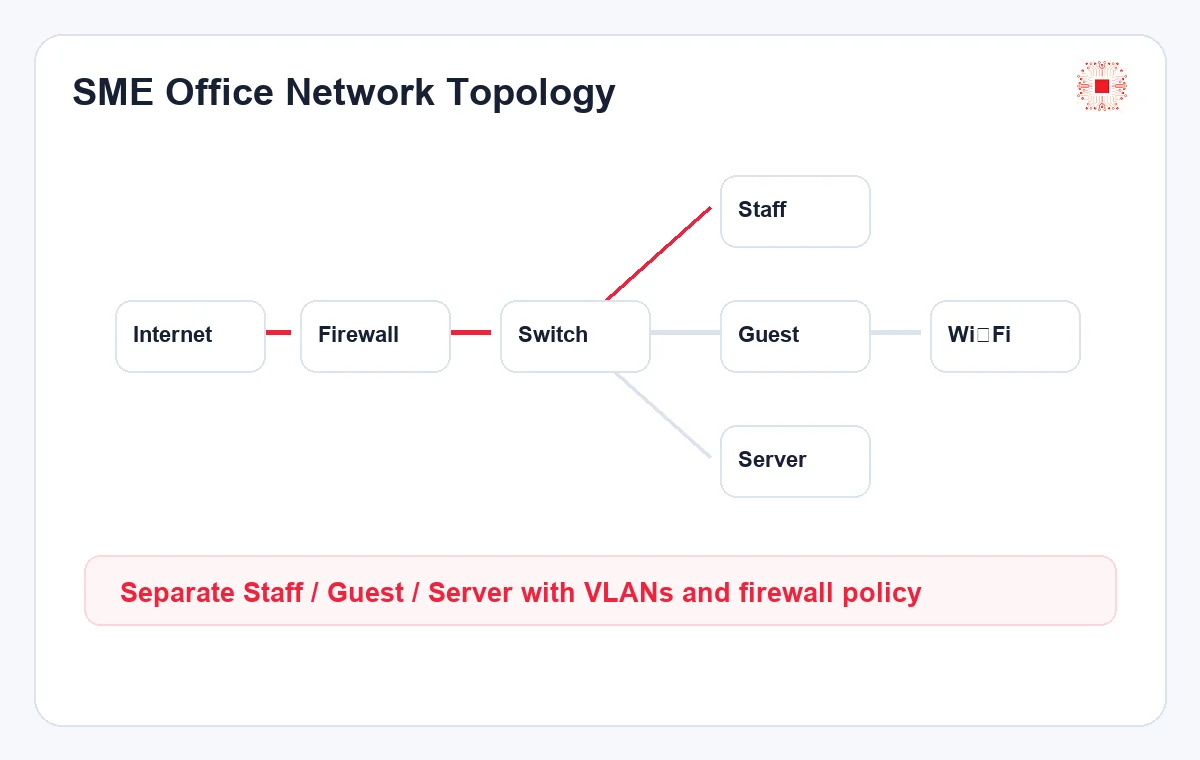
Assess workplaces, devices, applications, traffic and wireless coverage. Design LAN/Wi-Fi, segmentation where needed, firewall/VPN and branch connectivity. Test agreed scenarios; do not promise throughput without site measurements.
Servers, cloud and applications
Review workloads, capacity, scaling, licensing and operating responsibility. Choose on-premises, cloud or hybrid based on the applications, and define ownership of accounts, licenses and data after handover.
Storage and collaboration
Compare NAS/file servers with SharePoint/OneDrive based on the source of truth, performance, permissions, cost and remote access. A hybrid approach is possible. RAID and sync are not substitutes for backup.
Identity and permissions
Create a role-based matrix for viewing, editing, sharing, approving and administering data. Assign access through groups, separate admin accounts, use MFA and define joiner, mover and leaver access changes.
Backup and recovery
Identify critical data, backup frequency and recovery objectives based on acceptable downtime. Separate backup access, monitor failures and test a restore within the agreed acceptance scope.

Migration and handover
Pilot before broad migration, with a schedule, rollback plan, application and permission tests. Hand over diagrams, configurations, asset/license lists, test records and administrative control to the business.
Six stages from assessment to acceptance
01. Assess
Inventory users, applications, devices, data, the current diagram and priority problems.
02. Design
Agree architecture, permissions, capacity, migration approach, risks and an itemized budget.
03. Pilot
Trial the setup with a suitable user and data group; test applications and access.
04. Deploy
Work to a change window with stop points, rollback steps and an authorized approver.
05. Test
Accept connectivity, permissions, applications, backup/restore and agreed failure scenarios.
06. Handover
Deliver diagrams, access matrix, configuration records, test results and business-controlled accounts.
Ongoing support after acceptance is a separate scope that should be explicit in the proposal or contract.
How is deployment priced?
A reliable quote cannot come from computer count alone. Separate assessment/design, equipment and licenses, installation/configuration, data migration, testing/handover, and optional post-deployment support. Sites, users, data volume, existing cabling, security requirements, deadlines and allowable downtime all affect scope.
Share your user count, sites, current storage, permission concerns and target date. We will define the assessment scope before estimating; you do not need to know every technical specification in advance.
Discuss scope and estimateFrequently asked questions
Does a small business need its own server?
Not necessarily. Start with applications, data, access, connectivity and operating cost. Microsoft 365/cloud may fit some teams; others need a local NAS or server.
Is a NAS a backup?
No. A NAS may be primary storage or one component of a backup strategy, but independent copies and a restore test are still needed.
Can we upgrade the existing system in stages?
Often, after mapping dependencies among applications, accounts, data and network. A staged plan limits disruption and permits validation before wider migration.
Who owns administrator access after handover?
The business should own its accounts, data and configuration records. The deployment provider's access should be documented and adjusted to the agreed post-project support scope.
How long will deployment take?
Only an assessment can establish that. A small office, data migration and multi-site environment have different complexity; allow time for testing and acceptance.
Explore the decisions behind the design
Four practical guides cover storage, access control, migration and acceptance before investment.

NAS, file server or SharePoint?
Compare applications, collaboration, access and operating costs.
Read the guide
Build a data access matrix
Define data owners, roles and approval or revocation workflows.
Read the guide
Migrate data without losing access
Pilot the move and verify permissions with real user accounts.
Read the guide
IT infrastructure acceptance checklist
Verify network, accounts, backup and handover evidence.
Read the guideRelated services after deployment
A build-out project is different from ongoing operations. Choose the scope that matches the current stage of your environment.
Start with the real environment
IT Systems will discuss your users, data, applications and risks before recommending hardware or a platform. Scope, acceptance deliverables and post-handover responsibilities are stated in the proposal.